

WordPress gives website owners a flexible platform for publishing content, managing pages, and building online businesses. But publishing a website is only the beginning. To improve organic visibility, you also need to understand keywords, search intent, technical SEO, content quality, website performance, and search data.
That is where SEO tools become useful.
The best SEO tools for WordPress are not necessarily the platforms with the longest feature lists. The right tools depend on what you need to accomplish. A blogger may need keyword research and content optimization, while a business website may need technical auditing, search performance monitoring, and local SEO. Larger websites and agencies may require crawling, backlink analysis, rank tracking, competitor research, and reporting.
This guide explains the most useful WordPress SEO tool categories, compares popular options, and shows how to build a practical SEO workflow without installing unnecessary plugins or paying for features you do not need.
Table of Contents
- What Are SEO Tools for WordPress?
- Why WordPress Websites Need SEO Tools
- Best SEO Tools for WordPress at a Glance
- WordPress SEO Plugins
- Keyword Research Tools for WordPress
- Technical SEO Tools for WordPress
- SEO Tools for WordPress Content Optimization
- Internal Linking Tools
- Rank Tracking Tools
- Backlink Analysis Tools
- Competitor SEO Tools
- Google Search Console for WordPress
- Website Performance Tools
- Free SEO Tools for WordPress
- SEO Tools for Small Business WordPress Websites
- SEO Tools for Agencies Managing WordPress Websites
- Best SEO Tools for WordPress: How to Choose
- Free vs. Paid SEO Tools for WordPress
- How Many SEO Tools Does a WordPress Website Need?
- Google SEO Guidance for WordPress Website Owners
- Creating Helpful WordPress Content
- Common WordPress SEO Tool Mistakes
- A Practical WordPress SEO Workflow
- WordPress SEO Tools Checklist
- Frequently Asked Questions
- Conclusion
What Are SEO Tools for WordPress?
SEO tools for WordPress are plugins, platforms, and online resources that help website owners research, optimize, monitor, and improve their websites for search engines.
They can help with tasks such as:
- Keyword research
- On-page optimization
- Technical SEO
- XML sitemaps
- Structured data
- Internal linking
- Search performance
- Rank tracking
- Backlink analysis
- Content research
- Competitor analysis
- Website performance
Some tools work directly inside WordPress, while others operate externally and analyze your website or search data.
For example, an SEO plugin can help you manage page titles and metadata from the WordPress editor. A crawler can examine the technical structure of your entire website. A keyword research platform can identify search opportunities. Google Search Console can show how your website performs in Google Search.
These tools solve different problems, so choosing the right combination is more important than trying to find one platform that does everything.
Why WordPress Websites Need SEO Tools
WordPress makes publishing relatively easy, but search optimization still requires research and ongoing analysis.
SEO tools can help answer important questions:
- What are potential customers searching for?
- Which topics are relevant to my audience?
- Can search engines access important pages?
- Are there broken links or redirect problems?
- Which pages receive search impressions?
- Which queries generate clicks?
- Which pages need content improvements?
- How are target keywords changing over time?
- What are competitors doing well?
- Are pages performing efficiently?
The answers help turn SEO from guesswork into a more structured process.
However, tools should support decision-making rather than replace it. An automated recommendation can identify a possible issue, but you still need to determine whether that issue matters and what action makes sense.
Best SEO Tools for WordPress at a Glance
The following tools cover different parts of the WordPress SEO workflow.
| Tool | Best for | Main category | Best suited to |
|---|---|---|---|
| Yoast SEO | On-page SEO and content guidance | WordPress plugin | Bloggers, businesses |
| Rank Math | Broad WordPress SEO functionality | WordPress plugin | Beginners to advanced users |
| All in One SEO | All-in-one WordPress SEO | WordPress plugin | Businesses and growing sites |
| Google Search Console | Search performance | Google tool | Every WordPress site |
| Ahrefs | Backlinks and keyword research | SEO platform | Content teams and SEOs |
| Semrush | Competitor and keyword research | SEO platform | Businesses and professionals |
| Screaming Frog SEO Spider | Technical audits | Crawler | Technical SEO |
| PageSpeed Insights | Performance analysis | Performance tool | Every website |
The best choice depends on the task.
For example, Yoast SEO, Rank Math, and All in One SEO are WordPress plugins, while Google Search Console, Ahrefs, Semrush, and Screaming Frog serve broader SEO functions outside the WordPress dashboard.
WordPress SEO Plugins
SEO plugins are often the first tools WordPress website owners consider.
They can simplify routine tasks such as:
- SEO titles
- Meta descriptions
- XML sitemaps
- Canonical URLs
- Schema-related settings
- Robots controls
- Social metadata
- Basic content analysis
But an SEO plugin should not be confused with a complete SEO strategy.
Installing a plugin does not automatically make a website rank. You still need useful content, appropriate keyword targeting, logical site structure, internal links, technical accessibility, and a good understanding of your audience.
You should also avoid installing several plugins that perform the same function. Overlapping SEO functionality can make your configuration harder to understand and maintain.
Yoast SEO
Yoast SEO is one of the most established WordPress SEO plugins. Its current feature set includes real-time SEO and readability guidance, XML sitemaps, schema-related functionality, and integrations with other SEO and analytics tools.
It can be a practical choice for website owners who want SEO guidance directly inside the WordPress editing experience.
Best for: On-page optimization, content guidance, and straightforward WordPress SEO management.
Rank Math
Rank Math provides a broad collection of WordPress SEO features, including content optimization, schema markup, XML sitemaps, SEO checks, and internal-linking functionality.
Its wide feature set can appeal to users who want to manage many SEO functions from one plugin.
Best for: Users who want a feature-rich WordPress SEO plugin.
All in One SEO
All in One SEO provides tools for SEO titles and descriptions, XML sitemaps, schema, local SEO, WooCommerce SEO, redirects, internal linking, and Search Console integration.
It also offers a free version with core SEO functionality, while more advanced features are available through paid plans.
Best for: Businesses and website owners looking for an all-in-one WordPress SEO toolkit.
Which WordPress SEO Plugin Should You Choose?
There is no universal winner.
A better approach is to compare:
- Features you actually need
- Ease of configuration
- Compatibility with your website
- Performance impact
- Support and documentation
- Migration options
- Whether another plugin already handles overlapping functionality
Choose one primary SEO plugin and configure it carefully instead of installing several plugins simply because they offer different SEO scores.
Keyword Research Tools for WordPress
Keyword research helps you understand how people search for information, products, and services.
For a WordPress website, keyword research can guide:
- Blog topics
- Service pages
- Product pages
- Category pages
- FAQs
- Supporting content
- Content clusters
Suppose you run a website about digital marketing.
A broad topic such as SEO can lead to more specific subjects such as:
- SEO tools for WordPress
- WordPress technical SEO
- SEO plugins for WordPress
- WordPress keyword research
- WordPress site speed
- WordPress internal linking
This gives you a starting point for organizing content around related search needs.
Do Not Focus Only on Search Volume
Search volume is useful, but it should not be the only metric you consider.
A keyword with high volume may be too broad or highly competitive. A more specific keyword may have less estimated traffic but be much more relevant to your audience.
Consider:
Relevance + Search Intent + Competition + Business Value + Content Opportunity
Long-Tail Keywords
Long-tail keywords are more specific search phrases.
For example:
WordPress SEO
is broad.
How to improve technical SEO on a WordPress website
is much more specific.
Specific searches can reveal clearer problems and often provide better direction for content creation.
Technical SEO Tools for WordPress
Technical SEO tools help you investigate how search engines access, crawl, interpret, and monitor your website.
Important areas include:
- Crawling
- Indexability
- Broken links
- Redirects
- Canonical URLs
- XML sitemaps
- Duplicate URLs
- Structured data
- Mobile usability
- Page performance
Website Crawlers
A crawler can follow links across your website and identify technical patterns that may be difficult to find manually.
This becomes increasingly valuable as a WordPress website grows.
For example, a small blog with 20 pages can be checked manually. A website with thousands of posts, categories, tags, product pages, and media resources is a different situation.
Indexability Checks
A WordPress page can exist on your website without necessarily being indexed by Google.
Technical tools can help identify pages with signals that may affect whether search engines can access or index them.
However, a technical report should be investigated rather than followed blindly.
Broken Links and Redirects
Broken internal links can create poor user experiences and maintenance problems.
Redirects are also important when URLs change.
A technical SEO tool can help locate these issues so you can decide which ones need attention.
XML Sitemaps
XML sitemaps help communicate URLs that you want search engines to discover.
A sitemap is useful, but it does not guarantee that every URL will be indexed.
It should therefore be treated as one component of a broader technical SEO setup.
SEO Tools for WordPress Content Optimization
Content optimization is not simply about inserting a keyword into a WordPress article multiple times.
Good content optimization considers:
- Search intent
- Topic coverage
- Page structure
- Headings
- Internal links
- Metadata
- Readability
- User needs
Optimize for the Searcher’s Goal
Before changing an article, ask:
What does someone searching this query actually want?
If the intent is informational, provide a useful explanation.
If the intent is commercial, help the reader compare options.
If the intent is transactional, make it easy to take the appropriate next step.
Matching intent is more important than forcing a keyword into every section.
Use SEO Scores Carefully
Many WordPress plugins provide content scores or checklists.
These can be useful during editing, but a perfect score is not the goal.
A page can receive a high plugin score while still being:
- Thin
- Repetitive
- Poorly targeted
- Unhelpful
- Over-optimized
Use the tool as an assistant, then review the content as a human reader.
Internal Linking Tools
Internal links connect one page of your website to another.
They can help users discover related information and make large websites easier to navigate.
For a WordPress SEO cluster, internal linking can create relationships between broader and narrower topics.
For example:
Best SEO Tools
can link to:
- Free SEO Tools
- SEO Tools for Small Businesses
- SEO Tools for Agencies
- SEO Tools for WordPress
And this WordPress-specific article can link naturally to those more focused resources when they provide additional context.
The goal should be relevance, not simply increasing the number of internal links.
Rank Tracking Tools
Rank tracking platforms monitor selected search queries over time.
Depending on the platform, they may provide information about:
- Keyword positions
- Locations
- Devices
- Ranking history
- Competitors
- SERP features
Rank tracking is useful for measuring trends, but rankings should not be treated as the only measure of SEO success.
A keyword can move from position 12 to position 8 without producing a meaningful business improvement.
Likewise, a page may gain impressions for many related searches without a major change in one manually tracked keyword.
For a broader view, compare rankings with:
- Impressions
- Clicks
- CTR
- Organic traffic
- Conversions
- Page-level performance
Backlink Analysis Tools
Backlinks are links from external websites to your website.
Backlink analysis tools can help investigate:
- Referring domains
- Backlinks
- Anchor text
- Competitor links
- Link growth
- Potentially relevant websites
The goal should not be to collect the largest possible number of backlinks.
A relevant link from a useful website can be more meaningful than many unrelated links.
Backlink tools are particularly useful for competitive research. They can help you understand which types of websites and resources are attracting links within your industry.
Do not simply copy a competitor’s backlink profile. Use the information to understand opportunities and develop your own relevant content and outreach strategy.
Competitor SEO Tools
Competitor research can reveal useful information about how other websites approach search.
You can investigate:
- Topics
- Keywords
- Content formats
- Organic visibility
- Backlinks
- Search intent
- Content gaps
The purpose is not to reproduce another website.
Instead, ask:
- What topics are important in this market?
- Which questions do competitors answer?
- What information appears to be missing?
- Can we provide a clearer explanation?
- Can we add original experience or useful examples?
A content gap is valuable only when the topic is relevant to your audience and you can create genuinely useful content around it.
Google Search Console for WordPress
Google Search Console is one of the most useful free resources for WordPress website owners.
Google describes Search Console as a tool that helps website owners and SEO professionals understand how their websites perform in Google Search.
It can provide information about:
- Search queries
- Clicks
- Impressions
- CTR
- Average position
- Pages
- Search appearance
- Devices
- Countries
This first-party search data can help you understand what is actually happening with your website.
For example, suppose a WordPress article receives many impressions but relatively few clicks.
That could be a reason to review:
- Search intent
- Page title
- Meta description
- Content relevance
- Search-result competition
Search Console should not be treated as a ranking guarantee or a replacement for broader SEO analysis. It is a source of valuable evidence that can support better decisions.
Google Search Console reports for website owners
Website Performance Tools
Website performance is another important part of a WordPress SEO workflow.
Performance tools can help investigate:
- Loading behavior
- Large resources
- Images
- JavaScript
- CSS
- Caching
- Mobile experience
- Core Web Vitals
Performance optimization is not simply about chasing a perfect score.
A website should be responsive, usable, and efficient for real visitors.
WordPress websites can become slower as plugins, scripts, tracking systems, themes, and media files accumulate.
That is why performance should be considered when selecting plugins as well as when optimizing individual pages.
Free SEO Tools for WordPress
You do not need an expensive SEO subscription to start improving a WordPress website.
Free resources can help with:
- Search performance
- Basic keyword research
- Technical checks
- Page performance
- Content research
- SEO education
If you are working with a limited budget, explore free WordPress SEO resources before paying for advanced platforms.
Free tools can be especially useful for small websites and beginners who are still learning what SEO data they actually need.
SEO Tools for Small Business WordPress Websites
Small business websites often benefit from a focused SEO toolkit.
Common requirements include:
- Keyword research
- Local SEO
- Technical checks
- Search performance
- Content optimization
- Basic reporting
A local service business, for example, may need to understand location-specific searches, improve service pages, monitor search visibility, and make sure important pages are accessible.
It may not need enterprise-level reporting or advanced automation.
For a more focused discussion, see our guide to SEO tools for smaller WordPress businesses.
The principle is simple:
Buy or install according to your needs, not according to the number of features advertised.
SEO Tools for Agencies Managing WordPress Websites
Agencies often manage several WordPress websites at the same time.
That creates different requirements, such as:
- Multiple projects
- Client reporting
- Rank tracking
- Technical audits
- Competitor research
- Backlink analysis
- Repeatable workflows
- Automation
An agency may benefit from tools that centralize projects and reduce repetitive work.
However, not every agency needs the same platform.
The right choice depends on client volume, services offered, reporting requirements, team size, and workflow complexity.
For more information, see our guide to agency platforms for managing WordPress SEO.
Best SEO Tools for WordPress: How to Choose
Instead of asking which tool is universally best, use a practical selection process.
Step 1: Define the problem
Start with the SEO problem.
Do you need:
- Keyword ideas?
- Technical auditing?
- Search data?
- Content optimization?
- Rank tracking?
- Backlink research?
- Performance testing?
Step 2: Identify the required data
Determine what information will help you make the decision.
Step 3: Compare relevant tools
Compare tools based on your actual requirements rather than feature count.
Step 4: Check compatibility
For WordPress plugins, check compatibility with your WordPress version, theme, hosting environment, and existing plugins.
Step 5: Consider performance
Ask whether the plugin introduces unnecessary scripts, settings, or functionality.
Step 6: Test before committing
Use a real SEO task to evaluate whether the tool produces useful information.
Step 7: Keep your stack manageable
If two tools perform the same job, decide whether both are really necessary.
Step 8: Review results
A tool should help you make better decisions, not simply produce more reports.
For a broader comparison of SEO platforms, see our SEO tool selection for website owners.
Free vs. Paid SEO Tools for WordPress
| Factor | Free tools | Paid tools |
|---|---|---|
| Cost | Free or limited | Subscription or paid license |
| Data | Often more limited | Usually broader |
| Advanced research | May be limited | Often more extensive |
| Reporting | Basic in many cases | More advanced options |
| Automation | Limited | More available |
| Best for | Small websites and beginners | Larger or more complex workflows |
Paid does not automatically mean better.
A free tool may completely solve a specific problem, while a paid platform becomes worthwhile when you need additional data, scale, automation, or reporting.
How Many SEO Tools Does a WordPress Website Need?
There is no correct number.
A small website might need only:
- One SEO plugin
- Search Console
- Keyword research
- Performance testing
- Basic technical checks
A larger site may add:
- Rank tracking
- Backlink analysis
- Competitor research
- Advanced crawling
- Reporting
- Content optimization
The goal is to create a useful SEO stack, not a large one.
If a tool does not help you answer an important question or complete a useful task, there may be little reason to keep it.
Google SEO Guidance for WordPress Website Owners
Third-party SEO tools can be useful, but WordPress website owners should also understand Google’s fundamental SEO guidance.
Google’s SEO Starter Guide explains that SEO helps search engines understand website content and helps users discover sites through search. It also emphasizes useful, well-organized, original, and people-first content.
Google’s guidance for improving website visibility
This matters because no plugin or SEO platform can guarantee a particular ranking.
Tools provide data and recommendations. Your job is to interpret that information and make appropriate decisions.
Creating Helpful WordPress Content
SEO tools can identify keywords, related topics, and content opportunities, but they should not turn your writing into a checklist.
The final page should help the reader.
Google’s guidance recommends creating content that is useful, reliable, original, easy to read, and designed for people rather than created primarily to manipulate search rankings.
Google’s recommendations for helpful web content
Before publishing a WordPress article, ask:
- Does it clearly answer the searcher’s question?
- Is the information accurate and understandable?
- Does it provide something useful beyond generic advice?
- Is the structure easy to navigate?
- Are internal links genuinely relevant?
- Does the content avoid unnecessary repetition?
- Would a reader feel that the page solved their problem?
These questions are more valuable than trying to achieve a perfect plugin score.
Common WordPress SEO Tool Mistakes
Installing too many plugins
More plugins do not automatically create better SEO.
Using overlapping SEO plugins
Avoid multiple plugins controlling the same SEO functions unless you have a specific technical reason.
Chasing perfect SEO scores
Plugin scores are internal measurements. They are not Google ranking scores.
Focusing only on keywords
Keywords are useful for understanding search demand, but SEO also involves intent, content quality, technical accessibility, internal linking, and user experience.
Ignoring search intent
A page can contain the target keyword and still fail to answer what the searcher wants.
Buying tools you do not need
Advanced software is useful when you need advanced functionality. It is not necessary simply because it exists.
Copying competitors
Competitor research should inspire analysis and opportunities, not duplicated content.
Measuring only rankings
Rankings are one signal. Combine them with impressions, clicks, CTR, traffic, and relevant conversions.
Following every automated recommendation
Tools can identify potential improvements, but not every recommendation deserves implementation.
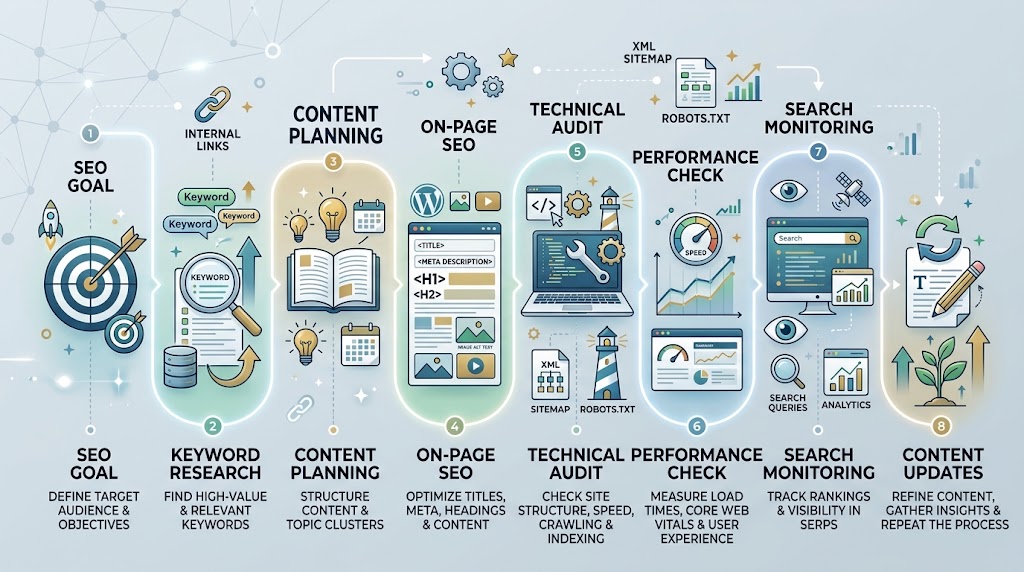
A Practical WordPress SEO Workflow
A simple workflow can look like this:
Keyword Research → Content Planning → On-Page Optimization → Technical Check → Performance Review → Search Monitoring → Updating
Keyword research
Identify relevant topics and searches.
Content planning
Create the appropriate page for the searcher’s intent.
On-page optimization
Improve headings, titles, metadata, internal links, structure, and clarity.
Technical check
Review indexing, redirects, broken links, sitemaps, canonicals, and other relevant technical elements.
Performance review
Check whether pages provide a good experience across devices.
Search monitoring
Use search performance data to identify changes and opportunities.
Updating
Improve existing pages when new information, search behavior, or performance data provides a genuine reason to do so.
This creates an ongoing SEO improvement cycle rather than a one-time optimization exercise.
WordPress SEO Tools Checklist
Before building your toolkit, consider whether you have coverage for:
- Keyword research
- WordPress SEO plugin
- Technical SEO auditing
- Search performance
- Rank tracking
- Content research
- Backlink analysis
- Competitor research
- Performance testing
- Reporting
You do not need every category immediately.
Start with the tasks that matter most to your website and add new tools when your requirements become more advanced.
Frequently Asked Questions
What are the best SEO tools for WordPress?
The best SEO tools depend on your specific needs. WordPress plugins such as Yoast SEO, Rank Math, and All in One SEO can help with on-page and technical tasks, while Google Search Console, keyword research platforms, crawlers, backlink tools, and performance tools cover other parts of SEO.
What is the best WordPress SEO plugin?
There is no universal best plugin. Yoast SEO, Rank Math, and All in One SEO all provide substantial SEO functionality, but the right choice depends on your preferred workflow, features, compatibility, and technical requirements.
Do I need an SEO plugin for WordPress?
An SEO plugin can make many tasks easier, but it is not a complete SEO strategy. You may also need keyword research, technical auditing, search performance analysis, content research, and performance testing.
Are free SEO tools enough for WordPress?
They can be enough for many small websites and beginner workflows. Paid tools become more useful when you need larger datasets, advanced research, automation, or detailed reporting.
Can SEO tools guarantee higher rankings?
No. SEO tools provide data and recommendations, but they cannot guarantee rankings. Google itself states that there are no methods that automatically guarantee a first-place ranking.
Which SEO tools are useful for technical WordPress SEO?
Technical SEO tools can help investigate crawling, indexability, redirects, broken links, canonical URLs, sitemaps, structured data, duplicate URLs, and performance.
Should I use more than one WordPress SEO plugin?
Usually, you should avoid installing multiple plugins that perform the same core SEO functions. A simpler setup is generally easier to understand and maintain.
How many SEO tools should a WordPress website use?
There is no fixed number. Start with the tools that solve your current SEO problems and expand your toolkit only when your website requires additional capabilities.
Conclusion
The best SEO tools for WordPress are not necessarily the tools with the most features.
The right toolkit depends on the website’s size, goals, technical requirements, content strategy, and level of SEO experience.
A WordPress SEO plugin can simplify on-page and technical controls. Keyword research tools can help identify relevant search opportunities. Technical crawlers can uncover website issues. Search Console can provide first-party search performance data. Rank tracking, backlink analysis, competitor research, content optimization, and performance tools can add value as your SEO workflow becomes more advanced.
The most effective approach is to start with a clear problem, choose the appropriate tool, understand the information it provides, take a practical action, and measure the outcome.
Do not install plugins simply because they have impressive feature lists. Do not chase perfect SEO scores. And do not assume that a tool can replace good content or sound SEO judgment.
Build a focused toolkit around your actual WordPress SEO needs, keep your setup manageable, and expand it only when a new requirement justifies another tool.
That approach gives you a more sustainable SEO workflow—and makes your tools work for your website instead of letting your website become dependent on your tools.


