

Small businesses do not need dozens of SEO platforms to improve their visibility in search. What they need is a practical system for finding opportunities, identifying website problems, understanding search performance, improving useful content, and monitoring progress.
The best SEO tools for small businesses depend on the business itself. A local service company may prioritize local search and website health, while an online store may need keyword research, competitor analysis, technical SEO, and content optimization. A small professional-services firm may focus more heavily on commercial keywords, useful service pages, and search-performance data.
The right approach is to start with the business goal, identify the SEO task, and then choose the simplest tool capable of providing the information needed. This avoids unnecessary subscriptions and makes SEO easier to manage.
This guide explains the main types of SEO tools available to small businesses, what each type can help with, how free and paid options differ, and how to build a focused SEO workflow without unnecessary complexity.
Why Small Businesses Need SEO Tools
SEO tools are designed to make research, analysis, monitoring, auditing, and reporting easier. They do not replace strategy or guarantee search visibility.
For a small business, useful tools can help answer questions such as:
- What are potential customers searching for?
- Which pages are receiving search visibility?
- Are important pages being indexed?
- Are there broken links or technical problems?
- Which topics deserve new content?
- What are competitors covering?
- Which keywords should be monitored?
- Are organic search trends changing?
Find Search Opportunities
Keyword research tools can help discover relevant queries, long-tail searches, questions, and commercial opportunities.
The objective should not be to collect as many keywords as possible. The goal is to identify searches that connect with the products, services, audience, and locations the business actually serves.
Understand Website Performance
First-party search data can show how a website is appearing in Google Search. Search Console, for example, provides metrics such as clicks, impressions, CTR, and average position, along with dimensions such as queries and pages.
Identify Technical Problems
Audit and diagnostic tools can help uncover broken links, indexing concerns, redirects, sitemap issues, metadata problems, and other technical areas that may require attention.
Improve Content
Content tools can support topic research, search-intent analysis, page structure, and on-page optimization.
Monitor Competitors
Competitor research can help businesses understand the topics, keywords, pages, and links that appear relevant within their market.
Track Progress
Rank tracking and search-performance data can provide different views of SEO progress. Rankings are useful, but they should not be treated as the only measure of success.
Tools provide information. Business owners still need to decide what the information means and what action is appropriate.
What Should Small Businesses Look for in SEO Tools?
The best SEO software for a small company is not necessarily the platform with the most features.
Ease of Use
A tool should be understandable enough for the person actually responsible for SEO. Complicated reports are not useful if nobody knows how to interpret them.
Useful Data
Prioritize data that answers real business questions. More data is not automatically better.
Affordable Access
Consider how often the tool will be used and whether its capabilities justify its ongoing cost.
Local SEO Capabilities
Businesses serving particular towns, cities, or regions may need location-focused research and monitoring.
Keyword Research
Look for tools that help identify relevant search terms, variations, questions, and search intent.
Technical Auditing
A useful auditing solution should help identify technical issues that deserve investigation rather than simply producing a large list of warnings.
Reporting
Reports should make it easier to understand what changed, why it matters, and what should happen next.
Integrations
Connections with website, search-performance, analytics, CMS, or reporting systems can reduce repetitive work.
Scalability
A tool should be capable of supporting the business as its SEO activity grows, but a small website should not pay for enterprise-level capabilities it does not need.
Types of SEO Tools Small Businesses Can Use
| Tool Type | Main Use | Why It Matters |
| Keyword research | Find search opportunities | Helps plan content and landing pages |
| Site audit | Find technical problems | Helps maintain website health |
| Search performance | Monitor organic results | Shows actual search activity |
| Local SEO | Investigate local visibility | Useful for location-based businesses |
| Content tools | Research and improve pages | Supports useful content |
| Rank tracking | Monitor keyword positions | Helps identify ranking trends |
| Backlink tools | Analyze links | Provides link-profile information |
| Competitor tools | Research competitors | Helps identify opportunities |
One platform may cover several of these functions. A small business therefore does not need to purchase a separate tool for every task.
Keyword Research Tools for Small Businesses
Keyword research should start with relevance, not maximum search volume.
Small businesses can research:
- Relevant product and service keywords
- Long-tail queries
- Location-based searches
- Commercial-intent searches
- Informational questions
- Problem-focused searches
- Product or service comparisons
- Related topics and keyword variations
Focus on the Right Searcher
A keyword is valuable when it connects the business with a meaningful customer need.
For example, a local home-service company may find a highly specific service-and-location query more useful than a broad national keyword that attracts people outside its service area.
Consider Search Intent
Search intent helps explain what the user wants.
Informational intent usually involves learning something.
Commercial intent involves researching products, services, or providers.
Transactional intent is closer to taking an action.
Local intent involves finding something associated with a particular location.
Small businesses should build keyword lists around the customers they actually want to reach.
Search volume and competition can provide useful context, but they should not override relevance.
SEO Tools for Local Search
Local businesses have additional SEO considerations because customers may search for services, products, or businesses associated with a specific area.
Depending on the business, useful local SEO tools can support:
- Local keyword research
- Local visibility monitoring
- Business profile management
- Review monitoring
- Business information checks
- Location-specific landing pages
- Competitor research
A local business should also make sure its website clearly explains what it offers, where it operates, and how customers can contact it.
Local SEO tools are useful for research and monitoring, but businesses should avoid treating a single local ranking score as a complete measure of search performance.
Website Audit Tools for Small Businesses
Website audit tools can help identify technical and on-page problems that are difficult to find manually.
Common audit areas include:
- Broken links
- Indexing problems
- Redirect issues
- Missing metadata
- Sitemap problems
- Mobile-related concerns
- Performance issues
- Canonical configuration
- Crawl-related issues
Google Search Console can also provide first-party information about indexing and search performance. Its Page Indexing report helps website owners understand which pages Google can find and index and where indexing problems have been identified.
Do Not Follow Audit Scores Blindly
Automated audits should be treated as investigation tools.
A warning may be intentional, low priority, or irrelevant to a particular page. Before making changes:
Review the warning → Understand the cause → Verify it → Assess its importance → Fix if necessary → Recheck
This is more reliable than trying to eliminate every warning simply to achieve a perfect software score.
Search Performance Tools
First-party search data is especially valuable because it provides information about a website’s actual performance in Google Search.
Search Console’s Performance report can show:
- Impressions
- Clicks
- CTR
- Average position
- Search queries
- Top pages
- Countries
- Devices
- Search appearance
Google explains that the report can be filtered and grouped by different dimensions, including queries, pages, countries, devices, search appearance, and dates.
For a small business, this can reveal:
- Which pages receive search visibility
- Which queries generate impressions
- Which pages receive clicks
- Where search visibility is changing
- Which pages may deserve further investigation
Search Console data should be interpreted carefully. Search results can vary according to factors such as time, location, device, and search context.
Content and On-Page SEO Tools
Content tools can help businesses research and improve pages, but the reader should remain the priority.
Useful areas include:
- Content structure
- Search intent
- Topic coverage
- Keyword relevance
- Internal linking
- Readability
- Page titles
- Meta descriptions
- Related questions
A tool may suggest adding a keyword or topic, but that does not mean the recommendation should be followed mechanically.
A service page should clearly explain the service. A product page should help customers understand the product. An informational article should genuinely answer the user’s question.
The strongest use of content software is to identify possible gaps and then use human judgment to decide whether those gaps actually matter.
Competitor Research Tools
Competitor research can help a small business understand the search landscape without copying another company’s strategy.
Useful research areas include:
- Competitor keywords
- Content topics
- Important landing pages
- Search visibility
- Backlink opportunities
- SERP competition
Instead of copying a competitor, ask:
- What customer questions are they answering?
- Which topics appear important in this market?
- Are there useful topics they have overlooked?
- Can your business explain the subject more clearly?
- Can you provide a better experience or more relevant information?
Competitor research should produce ideas and insights, not duplicate content.
Backlink Analysis Tools
Backlink analysis tools help businesses investigate links pointing to their own websites or competitors.
Important concepts include:
Referring Domains
Referring domains are websites that link to a target website.
Backlinks
Backlinks are individual links from one page to another website or page.
Anchor Text
Anchor text is the clickable text used within a link.
Competitor Links
Competitor backlink research can help identify websites, publications, directories, resources, or other sources that have linked to similar businesses.
Relevance Matters
Small businesses should avoid treating backlinks as a simple numbers game.
A large number of links does not automatically mean a better SEO strategy. Relevance, context, credibility, and the reason a website links to another resource should be considered.
The purpose of backlink research should be to understand the site’s link profile and identify legitimate opportunities, not simply accumulate links.
Rank Tracking for Small Businesses
Rank tracking can help monitor important keywords over time.
For small businesses, it is useful to distinguish between:
- Local rankings
- National rankings
- Desktop results
- Mobile results
- Different search locations
- SERP feature changes
- Historical trends
A business serving one city may care far more about relevant local visibility than a national ranking.
Rankings Are Only One Signal
A ranking position does not tell the entire story.
A small business may ultimately care about:
- Qualified visitors
- Calls
- Leads
- Bookings
- Inquiries
- Sales
- Relevant search impressions
- Organic clicks
Google also recommends focusing on meaningful performance trends rather than relying on position alone when evaluating Search Console data.
Free SEO Tools for Small Businesses
Small businesses can accomplish many foundational SEO tasks without immediately paying for expensive software.
Free resources can be useful for:
- Keyword research
- Search-performance monitoring
- Basic technical checks
- Content research
- Website diagnostics
- Local SEO tasks
Businesses can explore free resources for small business SEO before deciding whether they need more advanced capabilities.
Free resources are particularly useful when:
- The website is relatively small
- SEO is being handled by one person
- Research is occasional
- The business has limited reporting requirements
- The available SEO data is manageable
The main limitation is usually not usefulness but depth, scale, or convenience.
How WordPress Businesses Can Use SEO Tools
WordPress businesses commonly need SEO tools or plugins for:
- On-page optimization
- XML sitemaps
- Indexability
- Metadata
- Performance
- Broken links
- Content optimization
WordPress SEO plugins can manage certain settings directly within the CMS, while external tools can provide broader keyword, competitor, backlink, or auditing research.
However, installing multiple plugins that perform overlapping tasks can create unnecessary complexity. A focused setup is usually easier to manage.
Businesses using WordPress can explore WordPress solutions for search optimization when deciding which SEO capabilities they actually need.
SEO Tools for Agencies Supporting Small Businesses
Some small businesses manage SEO themselves, while others work with freelancers or agencies.
An agency managing multiple small-business websites may require more scalable workflows for:
- Multiple projects
- Client reporting
- Rank tracking
- Competitor research
- Backlink analysis
- Historical data
- Team workflows
- Recurring reports
An individual business owner may not need these capabilities, but they can become important when SEO management expands across multiple clients.
Businesses working with agencies can review agency SEO software options to understand the types of workflows that become important at larger scales.
How to Choose the Right SEO Tool
The best approach is to choose the task first and the tool second.
1. Define the Business Goal
Start with a clear objective.
For example:
- Improve local visibility
- Find service keywords
- Improve existing content
- Identify technical problems
- Research competitors
- Monitor organic search
2. Identify the SEO Problem
Ask what is preventing the business from reaching that goal.
3. Decide What Data Is Needed
A keyword research problem requires different information from a technical indexing problem.
4. Choose the Simplest Suitable Tool
Select a tool capable of answering the specific question.
5. Test the Results
Check whether the information is understandable, relevant, and useful.
6. Compare Where Necessary
Different tools may use different datasets and methodologies. When accuracy matters, compare important findings rather than assuming one platform is always complete.
7. Create a Repeatable Workflow
Turn useful research into a consistent process.
8. Upgrade Only When Necessary
If a free or existing tool is sufficient, another subscription may add little practical value.
For the broader process of evaluating SEO software, see the SEO tool selection framework.
Free vs Paid SEO Tools for Small Businesses
| Factor | Free Tools | Paid Tools |
| Cost | Low or none | Subscription |
| Data | Often limited | Usually broader |
| Projects | Often limited | More scalable |
| Reporting | Basic | Often more advanced |
| Best use | Starting and specific tasks | Larger or recurring workflows |
Free does not mean useless, and paid does not automatically mean better.
A free resource may be the best choice for a specific task if it provides the information required.
Paid software becomes more attractive when a business needs larger datasets, deeper competitor research, historical information, automation, reporting, multiple projects, or more efficient workflows.
How Much Should a Small Business Spend on SEO Tools?
There is no sensible universal SEO software budget for every small business.
Instead, consider:
- Business objectives
- Current SEO maturity
- Website size
- Number of websites
- Team size
- Required data
- Reporting requirements
- Frequency of SEO work
- Value of the workflow to the business
A business doing occasional keyword research has different requirements from a company managing hundreds of pages or several locations.
The cheapest option is not automatically the best if it creates unnecessary manual work. Likewise, an expensive platform may be unnecessary if the business uses only a small portion of its capabilities.
The better question is:
Does this tool solve an important SEO problem efficiently enough to justify its cost?
Google Resources Small Businesses Should Know
Small businesses should understand official Google guidance alongside third-party SEO tools.
Google Search Central provides documentation about how Google Search works, how websites can improve their search presence, and how website owners can approach SEO.
The documentation is useful because it provides Google’s own guidance rather than a software company’s interpretation of SEO.
Businesses can review Google’s advice for businesses appearing in search as part of their SEO learning process.
Measuring Organic Search Activity
Small businesses should use first-party data whenever possible rather than relying entirely on estimated third-party traffic figures.
Search Console can help evaluate:
- Search impressions
- Organic clicks
- CTR
- Average position
- Search queries
- Top pages
- Devices
- Countries
These reports can help identify pages and queries that deserve further investigation. Google also provides filters and comparison options that allow website owners to examine changes over different periods.
Businesses can use these ways to evaluate organic search activity to understand actual search activity on their own website.
Google SEO Recommendations for Small Websites
SEO tools should support SEO decisions, not replace official search guidance.
Google’s documentation covers fundamental areas such as technical requirements, spam policies, and important practices for websites appearing in Google Search.
Small businesses should therefore be cautious about treating third-party scores as official Google requirements.
A useful approach is:
Business knowledge + customer needs + reliable search data + technical understanding + human judgment
Businesses can review Google’s SEO recommendations for website owners alongside their SEO tools.
Common SEO Tool Mistakes Small Businesses Make
Buying Too Many Tools
Multiple subscriptions can create unnecessary costs and duplicate information.
Using Tools Without a Goal
A dashboard is not a strategy. Every tool should have a purpose.
Chasing High-Volume Keywords
High search volume does not automatically mean high business value.
Ignoring Local Intent
A local business should understand the geographic context of its customers.
Trusting Automated Scores
Software scores are useful signals, not Google ranking requirements.
Ignoring Search Intent
A keyword is not enough. The page must satisfy what the searcher is trying to accomplish.
Measuring Only Rankings
Clicks, impressions, qualified visitors, leads, and conversions may provide more useful business context.
Copying Competitors
Competitor research should reveal opportunities, not encourage duplication.
Paying for Unused Features
If a business rarely uses a platform’s advanced functions, the subscription should be reconsidered.
Simple SEO Tool Workflow for a Small Business
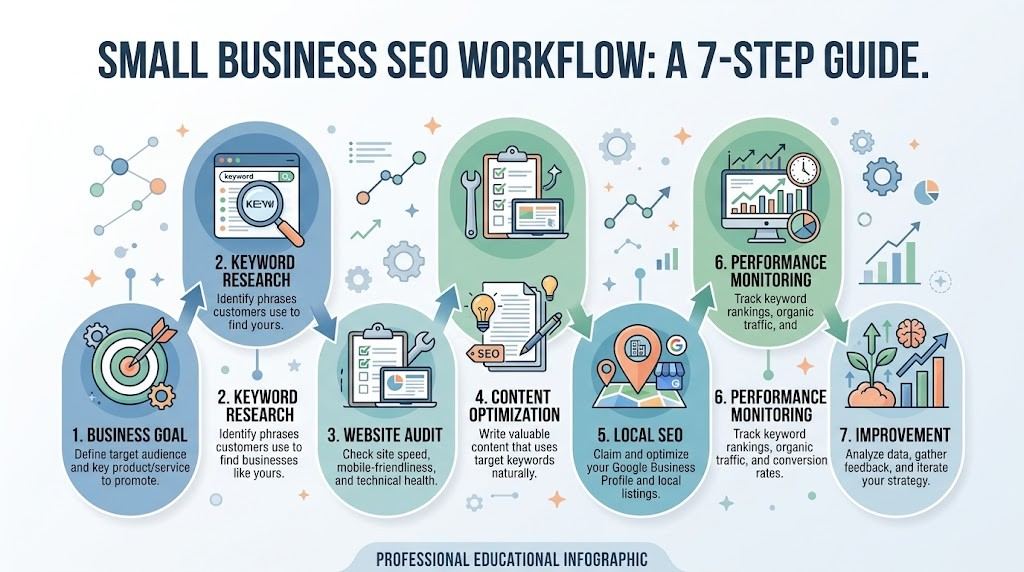
A practical workflow can be summarized as:
Goal → Keyword Research → Website Audit → Content Improvement → Technical Fixes → Search Performance Monitoring → Review Results → Update Strategy
Goal
Define the business outcome.
Keyword Research
Identify relevant search queries and topics.
Website Audit
Find technical and on-page issues worth investigating.
Content Improvement
Improve pages based on customer needs and search intent.
Technical Fixes
Resolve meaningful technical problems.
Search Performance Monitoring
Review impressions, clicks, queries, pages, and relevant trends.
Review Results
Look for meaningful patterns instead of reacting to every short-term fluctuation.
Update Strategy
Use the findings to decide what should be improved next.
This workflow keeps SEO focused on action rather than endless tool usage.
SEO Tools Checklist for Small Businesses
Keyword Research
- Identify relevant keywords
- Research long-tail queries
- Check location-specific searches
- Understand search intent
- Identify commercial opportunities
Local SEO
- Review local search visibility
- Research local queries
- Maintain accurate business information
- Monitor relevant local competitors
- Review location-specific pages
Technical SEO
- Check broken links
- Review indexing
- Check redirects
- Review metadata
- Check XML sitemaps
- Investigate performance concerns
Content
- Research topics
- Understand search intent
- Identify content gaps
- Improve page structure
- Review topic coverage
On-Page SEO
- Improve titles
- Review headings
- Check metadata
- Improve internal linking
- Keep content useful and relevant
Search Performance
- Monitor impressions
- Monitor clicks
- Review CTR
- Analyze queries
- Review important pages
Rank Monitoring
- Track important keywords
- Consider location
- Consider device
- Review historical trends
- Monitor SERP changes
Backlinks
- Review referring domains
- Investigate backlinks
- Analyze anchor text
- Research competitor links
- Evaluate relevance
Competitors
- Research competitor keywords
- Review competitor topics
- Analyze important pages
- Identify content opportunities
- Avoid copying
Reporting
- Record meaningful changes
- Compare appropriate time periods
- Connect SEO activity with business goals
- Focus reports on actionable findings
Frequently Asked Questions
What are the best SEO tools for small businesses?
There is no single best tool for every small business. The right choice depends on whether the main need is keyword research, local SEO, technical auditing, content optimization, competitor research, rank tracking, or search-performance analysis.
Do small businesses need paid SEO tools?
No. Many small businesses can begin with free resources. Paid tools become more useful when greater data depth, automation, reporting, historical information, or scalability is required.
What is the best free SEO tool for a small business?
It depends on the task. First-party Google resources are especially useful for understanding a website’s actual search performance, while other free resources can support keyword research, technical checks, and content research.
Which SEO tools help with local search?
Local SEO tools can assist with local keyword research, visibility monitoring, competitor research, and business information management. The best choice depends on the business’s location and SEO workflow.
Which SEO tools are useful for WordPress businesses?
WordPress businesses commonly need tools or plugins for on-page SEO, metadata, sitemaps, indexability, performance, broken links, and content optimization.
How many SEO tools does a small business need?
Usually only a few. Start with the tasks that matter most and add tools only when they solve a genuine problem or improve the workflow.
Should a small business track keyword rankings?
Yes, ranking data can provide useful context, especially for important local and commercial searches. However, rankings should be evaluated alongside impressions, clicks, qualified traffic, leads, and other business outcomes.
Can SEO tools improve a small business website?
SEO tools can identify opportunities and potential problems, but they do not improve a website automatically. People must interpret the data and implement appropriate changes.0
Conclusion
Small businesses do not need dozens of SEO tools to build an effective search workflow.
The better approach is to identify the business goal, determine the SEO task, choose reliable data sources, and use the simplest suitable tool. Free resources can cover many foundational tasks, while paid platforms become useful when a business needs greater depth, automation, reporting, or scale.
The best SEO tools for small businesses are ultimately the ones that make SEO decisions clearer and the workflow more efficient.
Tools provide data. Human judgment turns that data into useful SEO actions.


