

Many website owners want to improve their SEO without immediately committing to expensive software subscriptions. That is a reasonable approach, especially when a website is new, a business is still growing, or the main requirement is to solve a few specific SEO problems.
The good news is that many important SEO tasks can be completed with free resources. Free SEO tools can help with keyword research, search performance analysis, technical checks, content research, backlink investigation, on-page optimization, local SEO, and basic competitor research.
However, free does not always mean unlimited. Some tools are completely free, while others provide limited access to a larger paid platform. Some offer restricted reports, smaller datasets, or a limited number of searches.
That is why finding the best SEO tools free is less about finding one tool that does everything and more about choosing the right resource for the specific SEO task.
This guide explains what free SEO tools can realistically do, where their limitations appear, how to combine them into a practical workflow, and when paying for additional capabilities may make sense.
What Are Free SEO Tools?
Free SEO tools are software applications, browser-based resources, plugins, platforms, or search-engine resources that can be used without paying for full access.
They can support different stages of SEO, including research, analysis, monitoring, auditing, content optimization, and reporting.
However, there are several types of “free” SEO resources.
Completely Free Tools
Some resources provide their core functionality without requiring a subscription. These can be useful for specific SEO checks, research tasks, or website diagnostics.
Free Versions of Paid Tools
Many commercial SEO platforms offer free versions with restrictions. The free version may be useful for occasional research, while larger datasets or advanced features require a paid subscription.
Limited Free Trials
A free trial provides temporary access to paid functionality. It should not be confused with permanently free SEO software.
Free Google Tools
Google provides several resources that website owners can use to understand search visibility, website performance, indexing, and other aspects of search.
Freemium SEO Platforms
Freemium platforms combine free functionality with usage limits. Restrictions can apply to searches, projects, keywords, reports, users, or the amount of data available.
The important point is simple: free does not necessarily mean unlimited.
Before relying on a tool, check what data it actually provides and whether those limits affect the SEO task you are trying to complete.
What Can You Do With Free SEO Tools?
Free resources can support many foundational SEO activities.
| SEO Task | What Free Tools Can Help With |
| Keywords | Finding ideas and search terms |
| Technical SEO | Identifying basic website issues |
| Content | Topic and query research |
| Backlinks | Basic link investigation |
| Performance | Search visibility monitoring |
| Local SEO | Business visibility tasks |
| On-page SEO | Page-level checks |
The goal should not be to collect dozens of tools.
Instead, start with the problem you need to solve.
If you need keyword ideas, use a resource designed for keyword research. If you want to understand how your website performs in Google Search, use first-party search data. If you need to identify technical problems, use an appropriate auditing or diagnostic resource.
For a broader framework covering SEO software selection, see the complete SEO tool selection guide.
Free SEO Tools for Keyword Research
Keyword research is one of the areas where free resources can be particularly useful.
You can use free resources to discover:
- Long-tail keywords
- Related searches
- Questions
- Topic ideas
- Keyword variations
- Search intent
- Supporting subtopics
- Different content angles
Start With Search Intent
A keyword is more than a phrase with search demand.
You also need to understand what the person searching is trying to accomplish.
For example, a query about fixing a website problem may have informational intent. A query comparing two products may indicate commercial investigation. A location-specific service query may have local or commercial intent.
Understanding intent helps determine what type of page and content format is appropriate.
Find Long-Tail Opportunities
Long-tail searches are often more specific than broad keywords.
A practical research process can look like this:
Main topic → Related searches → Questions → Specific problems → Supporting topics
This approach can uncover content opportunities that may not appear when researching only broad keyword phrases.
Understand the Limitations
Free keyword research resources may restrict the number of suggestions, available metrics, competitor information, historical data, or keyword results.
Therefore, a free keyword database should not automatically be treated as a complete representation of what people search for.
Search results themselves can also provide useful research clues. Reviewing the pages appearing for a query can help you understand the dominant search intent, content format, and topics users are being shown.
Free Tools for Checking Search Performance
Search performance data is one of the most useful forms of SEO information because it comes directly from a search engine’s own reporting system.
Google Search Console can help website owners understand how their pages perform in Google Search.
Performance data can reveal information such as:
- Impressions
- Clicks
- Click-through rate
- Average position
- Search queries
- Top-performing pages
- Device patterns
- Search performance over time
This information can help answer practical questions:
- Which queries are generating impressions?
- Which pages are receiving organic clicks?
- Which pages receive visibility but relatively few clicks?
- Which queries are gaining visibility?
- Which pages deserve further optimization?
Search performance should be interpreted as a set of signals rather than a single score.
Average position, for example, should be considered in context because search results can vary according to factors such as location, device, search context, and the features displayed for a query.
Free Technical SEO Tools
Free technical SEO resources can help website owners investigate common website problems without immediately purchasing a comprehensive enterprise platform.
Depending on the resource, you may be able to identify:
- Crawl problems
- Broken links
- Indexing concerns
- Mobile usability issues
- Page-performance problems
- Sitemap issues
- Redirect problems
- Basic structured-data issues
- Accessibility or rendering concerns
Different tools provide different levels of technical analysis.
A simple diagnostic resource may focus on one page or a particular issue, while a crawler can examine multiple URLs and organize technical findings across a website.
Prioritize Important Issues
A technical audit can produce many warnings.
Not every warning deserves the same priority.
Start by asking:
- Can important pages be crawled?
- Can important pages be indexed?
- Is the issue affecting many URLs?
- Does it affect users?
- Is there a clear and safe way to fix it?
This prevents website owners from spending excessive time on minor warnings while more meaningful problems remain unresolved.
Free SEO Tools for Content Research
Free resources can also support content research.
They can help you investigate:
- Search questions
- Related topics
- Content gaps
- Search intent
- Supporting concepts
- Competing content structures
- Basic readability
- Topic coverage
A useful content research process is:
User question → Main answer → Supporting questions → Examples → Common problems → Practical solution
This keeps the research focused on what users need rather than simply producing a list of keywords.
Do Not Chase Content Scores
Some SEO platforms provide content scores or recommendations.
These can be useful as reference points, but they should not become the primary objective.
A page with a high software score is not automatically useful to readers. Likewise, a lower score does not necessarily mean that a page fails to satisfy its audience.
Evaluate content based on questions such as:
- Does it answer the user’s main question?
- Is the information clear?
- Does it provide meaningful value?
- Is the topic adequately covered?
- Is unnecessary repetition avoided?
- Can the reader take a useful next step?
Free Tools for Backlink Research
Backlinks are links from other websites to your website.
Backlink research can help you understand how websites are being referenced across the web.
Free resources may provide some ability to investigate:
- Backlink discovery
- Referring domains
- Anchor text
- Links pointing to specific pages
- Competitor backlink opportunities
However, free backlink tools may provide only a portion of the data available in larger commercial databases.
Different providers discover and process links differently, so one tool should not automatically be treated as a complete record of every backlink.
The more useful questions are often:
- What types of websites link to competitors?
- What content attracts references?
- Which publications are relevant to the industry?
- Which resource pages may be useful?
- What competitor pages appear to attract links naturally?
Backlink analysis should focus on relevance, quality, and context rather than simply accumulating link counts.
Free Rank Tracking Options
Dedicated rank-tracking software can be useful for ongoing monitoring, but smaller websites can begin with other sources of search-performance information.
Search Console data can help identify queries and pages that are appearing in search results, while manual searches can provide quick qualitative observations.
However, manual searches have limitations.
Search results can differ because of:
- Search location
- Device
- Search context
- Personalization
- SERP features
- Changes over time
A single search should therefore not be treated as a permanent ranking position.
For ongoing SEO analysis, it is better to combine available ranking information with broader performance signals such as impressions, clicks, and query trends.
SEO monitoring should also remain focused on observation rather than artificial searches, clicks, or other attempts to manipulate search results.
Free SEO Tools for Small Businesses
Small businesses usually do not need a large collection of SEO platforms.
A practical free SEO setup should focus on the areas that directly support the business:
- Local search visibility
- Basic keyword research
- Website health
- Search performance
- Content opportunities
- Competitor observation
Local businesses can benefit from understanding the queries people use when searching for services in their area.
For a more specific discussion of resources suitable for smaller websites and businesses, see free resources for small business SEO.
The key is to build a simple workflow that can actually be maintained.
Free SEO Tools for WordPress Websites
WordPress websites have several SEO requirements that can be addressed through free tools and resources.
Common areas include:
- On-page SEO
- XML sitemaps
- Metadata
- Indexability
- Performance
- Broken links
- Content research
- Website health
WordPress SEO plugins can help manage certain settings directly within the content management system, while external tools can provide additional analysis.
Website owners should avoid installing multiple plugins that perform the same job unless there is a clear reason to do so. Unnecessary duplication can make websites harder to manage.
For more WordPress-specific guidance, see SEO utilities for WordPress site owners.
Free SEO Tools for Agencies
Agencies can also use free SEO resources for individual investigations and smaller tasks.
Examples include:
- Quick technical checks
- Search-performance analysis
- Initial keyword research
- Basic competitor research
- Page-level content reviews
- Individual backlink investigations
The challenge is scale.
An agency managing many clients may eventually need centralized projects, larger datasets, automated reporting, historical information, multiple-user access, and scalable rank tracking.
Free resources can still remain useful for individual investigations, even after an agency adopts paid software.
For a broader comparison of agency requirements, see SEO platforms designed for agencies.
Choosing the Right SEO Tool for the Task
The most practical way to choose an SEO resource is to start with the problem rather than the software.
Use this framework:
SEO Goal → Required Data → Tool Type → Free Option → Test Results → Decide Whether More Capability Is Needed
Example: Keyword Research
SEO goal: Find new content opportunities.
Required data: Search terms, questions, related topics, and intent.
Tool type: Keyword research resource.
Free option: Use available suggestions and SERP research.
Decision: If the available information is sufficient, there may be no reason to purchase additional software.
Example: Technical SEO
SEO goal: Identify website problems.
Required data: Crawlability, indexability, broken links, redirects, and technical signals.
Tool type: Crawler or diagnostic resource.
Free option: Run available checks on important pages.
Decision: Consider paid software when website size or analysis requirements consistently exceed the free resource’s limits.
Free SEO Tools vs Paid SEO Tools
| Factor | Free Tools | Paid Tools |
| Cost | Low or none | Subscription |
| Data limits | Often present | Usually broader |
| Advanced research | May be limited | Usually stronger |
| Reporting | Basic to moderate | Often advanced |
| Best use | Individual tasks | Larger workflows |
Paid tools may provide larger databases, automation, historical datasets, broader competitor research, advanced reporting, or more scalable workflows.
However, paying for a tool does not automatically produce better rankings.
A free resource can be the right choice if it provides the information required for the current task.
When Should You Upgrade to Paid SEO Tools?
A paid SEO platform becomes more useful when free resources repeatedly create limitations in your workflow.
Larger Keyword Databases
A growing SEO operation may need to research larger sets of keywords across multiple topics, countries, or markets.
Deeper Competitor Research
More advanced competitor analysis may require broader keyword, page, and visibility datasets.
More Backlink Data
Link-building research can benefit from larger backlink databases and more detailed historical information.
Historical Datasets
Long-term SEO campaigns often benefit from being able to compare performance across longer periods.
Automated Reporting
Agencies and teams may save significant manual effort by automating recurring reports.
Multiple Projects
Managing several websites can create a need for centralized projects and scalable monitoring.
Team Collaboration
Larger teams may require shared workflows, multiple users, permissions, or standardized processes.
The decision to upgrade should be based on an actual workflow requirement rather than the assumption that professional SEO requires expensive software.
Using Google Resources Alongside Free SEO Tools
Third-party SEO resources can provide useful analysis, but understanding Google’s own search guidance is equally important.
Google Search Central provides documentation covering areas such as crawling, indexing, search appearance, technical considerations, and SEO fundamentals.
Website owners can use Google’s resources for understanding organic search to build a stronger foundation for evaluating SEO recommendations.
This is particularly useful when a third-party tool reports an issue or assigns a score. Understanding the underlying SEO principle makes it easier to decide whether a recommendation is genuinely important.
Monitoring Search Visibility With Free Data
Search performance data can help website owners identify which pages and queries deserve further investigation.
Google Search Console can be used to review:
- Search queries
- Pages
- Clicks
- Impressions
- CTR
- Average position
- Devices
- Countries
- Date ranges
For example, a page receiving substantial impressions but relatively few clicks may deserve an investigation into its search appearance, intent alignment, title, or content positioning.
Similarly, queries generating growing impressions can reveal topics that may deserve additional content development.
The objective is not to react to every small movement.
Instead, look for meaningful patterns that can guide useful SEO decisions.
The official ways to monitor Google search visibility can help website owners understand how this search-performance data is organized and interpreted.
Google Recommendations for Useful Website Content
SEO tools can help identify topics, queries, competitors, and possible areas for improvement.
They should not replace the process of creating genuinely useful content.
A strong content strategy starts with the audience.
Ask:
- What problem does the reader have?
- What information do they need?
- What would make the answer clearer?
- What useful context is missing?
- Can the content help them make a decision or complete a task?
Tool-generated suggestions should be treated as inputs rather than instructions.
Google’s guidance around creating helpful content provides useful context for building content around people rather than around automated scores.
Review Google’s recommendations for useful website content when evaluating whether your content strategy is genuinely focused on users.
Common Mistakes With Free SEO Tools
Using Too Many Tools
Because many free tools are easy to access, it can be tempting to build a large collection.
More dashboards do not necessarily produce better SEO.
Trusting Automated Scores Blindly
SEO scores can help organize an audit, but they are not Google ranking scores.
Chasing Keyword Difficulty
A low-difficulty keyword is not automatically valuable.
Relevance, intent, business value, and the ability to provide a strong answer also matter.
Ignoring Search Intent
A keyword may appear attractive in a database but still be unsuitable for the page you want to create.
Assuming Limited Data Is Complete
Free tools may provide only a sample or restricted dataset.
Using Outdated Information
SEO practices, search features, and software methodologies can change. Important decisions should be based on current information.
Treating Tool Recommendations as Google Requirements
A third-party recommendation is not automatically a Google requirement.
Focusing on Tools Instead of Users
SEO tools support decision-making. They are not the objective of SEO.
The ultimate goal is to help relevant users find useful information, products, services, or resources.
Expecting Enterprise-Level Analysis
Free tools can be excellent for foundational SEO work, but complex websites and large teams may eventually require greater scale, automation, and data depth.
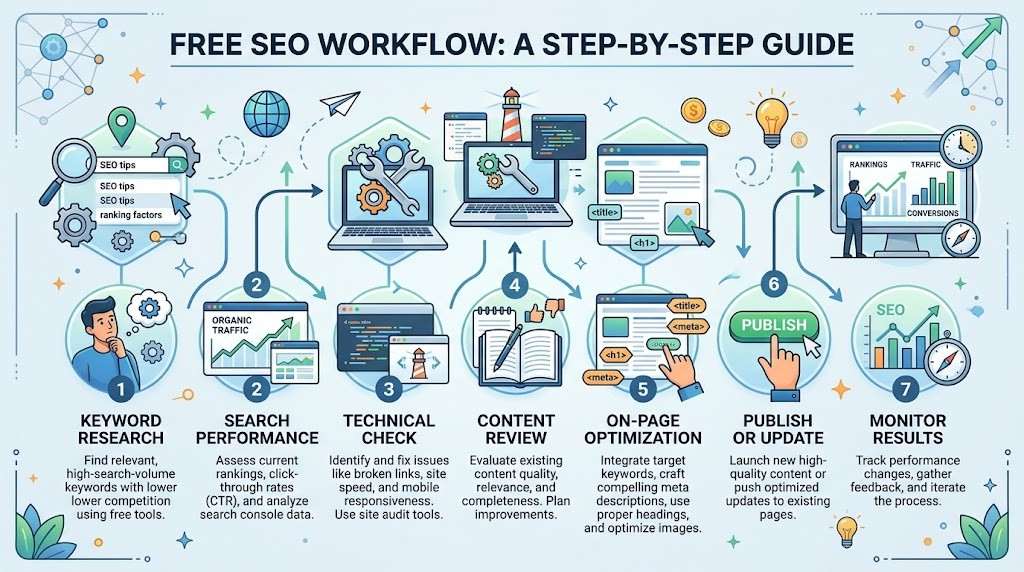
A Simple Free SEO Workflow
You can build a practical SEO process without starting with expensive software.
1. Define the SEO Objective
Decide what you want to improve.
Examples include organic visibility, content opportunities, technical health, local search visibility, or an existing page.
2. Research Search Queries
Find relevant searches, questions, related topics, and variations.
3. Review Search Intent
Determine what users are actually trying to accomplish.
4. Check Existing Performance
Review available search-performance data to understand how existing pages and queries are performing.
5. Audit the Page
Check the page for relevant technical, structural, and content issues.
6. Improve Content
Make the content clearer, more useful, comprehensive where appropriate, and better aligned with the searcher’s intent.
7. Check Technical Issues
Verify that important pages can be accessed and are technically suitable for search.
8. Review Internal Links
Connect relevant pages naturally to help users navigate related information and understand the site’s structure.
9. Publish or Update
Publish new content or make improvements to existing pages.
10. Monitor Performance
Review search-performance trends over time and use the findings to guide future improvements.
Free SEO Tools Checklist
Keyword Research
- Find keyword ideas
- Research long-tail searches
- Identify related searches
- Find questions
- Understand search intent
- Discover supporting topics
Search Performance
- Monitor impressions
- Review clicks
- Analyze CTR
- Observe average position
- Identify important queries
- Identify important pages
Technical SEO
- Check crawl problems
- Investigate broken links
- Review indexing concerns
- Check sitemaps
- Investigate performance issues
- Review basic structured-data concerns
Content Research
- Find questions
- Identify related topics
- Compare search intent
- Discover content gaps
- Review topic coverage
Backlinks
- Investigate referring domains
- Review available backlinks
- Examine anchor text
- Research competitor links
- Identify relevant link opportunities
Rank Monitoring
- Monitor important queries
- Consider search location
- Consider device differences
- Review trends over time
- Observe changes in SERP features
On-Page SEO
- Review titles
- Check meta descriptions
- Examine headings
- Review internal links
- Evaluate content relevance
Local SEO
- Monitor local visibility
- Research location-based searches
- Review important local pages
- Check business information
Reporting
- Record meaningful changes
- Save useful data
- Compare relevant time periods
- Focus reports on actionable findings
Frequently Asked Questions
What are the best SEO tools free?
There is no single free SEO tool that is best for every task. Different resources are better suited to keyword research, technical analysis, search performance, content research, backlinks, or local SEO.
Are free SEO tools actually useful?
Yes. Free SEO resources can support meaningful keyword research, technical checks, search-performance monitoring, content research, and other foundational tasks.
Can free SEO tools help with keyword research?
Yes. Free resources can help discover keyword ideas, related searches, questions, long-tail opportunities, and search-intent patterns. Their available data may be more limited than paid platforms.
Can I do SEO without paid tools?
Yes. Many foundational SEO tasks can be completed using free resources. Paid software becomes more useful when data requirements, automation, project volume, or reporting needs increase.
Which free SEO tools are best for beginners?
Beginners should prioritize simple resources that solve their immediate SEO problems. Search-performance monitoring, keyword research, and basic technical checks are useful starting areas.
Are free SEO tools enough for a small website?
They can be. A small website with a manageable number of pages may be able to perform substantial foundational SEO work using free resources.
When should I start paying for SEO tools?
Consider paying when you consistently need larger keyword databases, deeper competitor research, more backlink data, historical datasets, automated reporting, multiple projects, or scalable rank tracking.
Can free SEO tools improve rankings?
Free SEO tools can provide data and insights that help inform SEO decisions, but no tool guarantees rankings. Rankings depend on many factors, including relevance, content quality, technical implementation, competition, and how well a page satisfies the searcher’s needs.
Conclusion
Free SEO tools can support a large part of foundational SEO work.
They can help website owners research keywords, understand search intent, monitor search performance, investigate technical problems, research content topics, examine backlinks, review local visibility, and improve individual pages.
The key is to understand what each resource can and cannot do.
For beginners, bloggers, small businesses, and smaller websites, free tools may provide enough functionality for many important SEO tasks. As a website, agency, or SEO workflow grows, additional data, automation, historical information, reporting, and scalability may make paid software worthwhile.
The best approach is not to collect the largest number of tools.
Start with the SEO objective. Identify the information you need. Choose the simplest suitable resource. Test the results. Build a repeatable workflow. Upgrade only when your actual requirements justify additional capabilities.
Free SEO tools can be a powerful starting point, but the tools themselves are only part of the process. The quality of the SEO decisions made from their data ultimately matters more than the number of platforms being used.


