
A site migration is one of the few changes you can make to a website that can erase years of search visibility in a single weekend. The content might be identical and the new design might be far better, yet traffic drops anyway. The reason is simple: Google ranks pages based on their URLs, the links pointing at them, and the signals attached to them. Change the container without carrying those signals across, and the rankings stay behind with the old one. Here is how migrations go wrong, and a playbook for protecting your SEO.
What Counts as a Site Migration
A new domain is the obvious example, but a site migration also includes switching platforms (such as WordPress or Wix to Shopify), restructuring URLs, redesigning with new templates, or moving from HTTP to HTTPS. Each one changes how pages are addressed or built, and each one can cost rankings if details are missed.
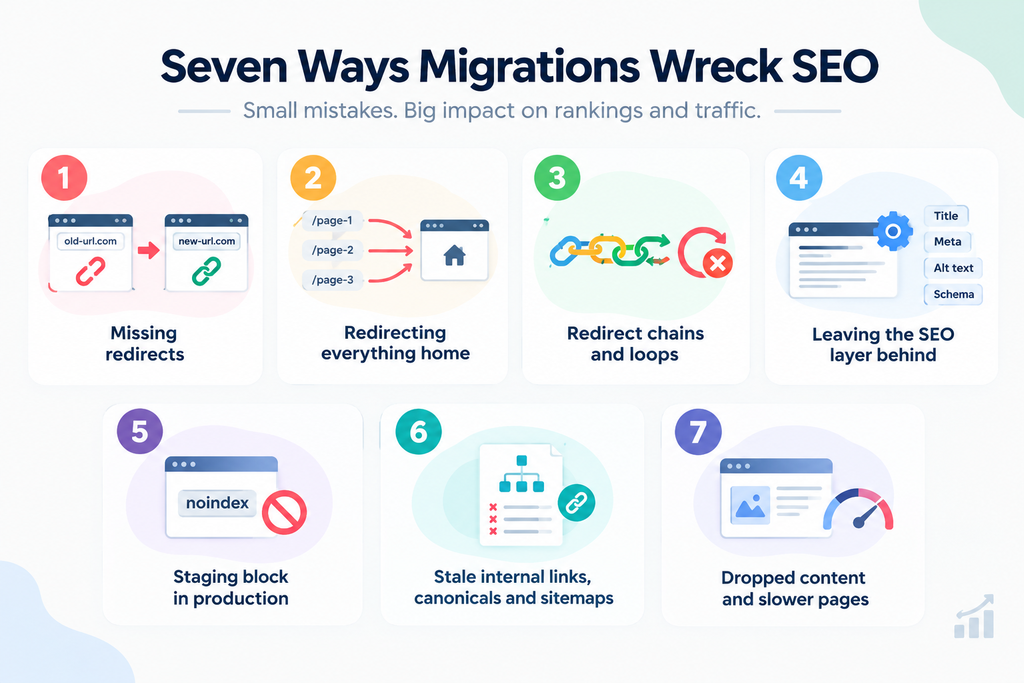
Seven Ways Migrations Wreck SEO
1. Missing redirects
When a URL changes and the old address has no 301 redirect, visitors and Google hit a dead end. The page drops out of the index and its backlinks stop passing value. This is the most common cause of traffic loss after a migration.
2. Redirecting everything to the homepage
A blanket redirect looks like a fix but is not one. Google wants each old page pointing to its closest new equivalent. Sending hundreds of unrelated URLs to one page says nothing useful about where your content went.
3. Redirect chains and loops
If page A redirects to B, which redirects to C, you waste crawl effort and dilute signals. Loops break pages entirely. This usually happens when a new migration is layered on top of old redirects.
4. Leaving the SEO layer behind
Title tags, meta descriptions, headings, image alt text, and structured data are easy to overlook because they are invisible on the page. A migration that moves content but not this layer leaves rebuild work you may not notice for weeks.
5. Shipping a staging block to production
Staging sites are usually set to noindex or blocked in robots.txt, which is correct while you test. Forgetting to remove that block at launch effectively tells Google to ignore your new site.
6. Stale internal links, canonicals, and sitemaps
If internal links, canonical tags, or your XML sitemap still point at old URLs, Google gets mixed signals about which version matters.
7. Dropped content and slower pages
Pruning pages during a redesign, or launching a heavier template, can quietly cost rankings. Content that earned traffic needs a new home, and page speed affects both search performance and user experience.
The Playbook to Prevent It
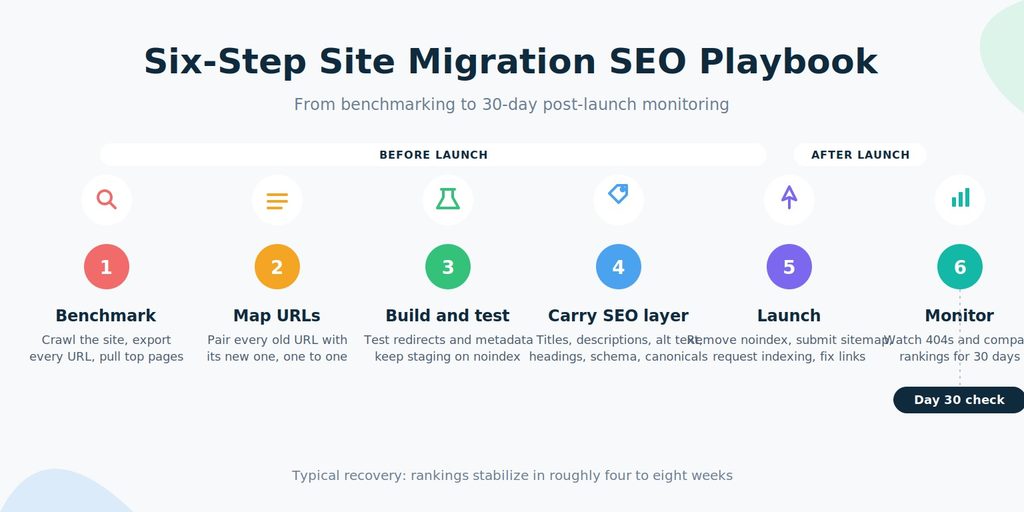
Step 1: Benchmark before you change anything
Crawl your current site, export every indexable URL, and pull your top pages by traffic, backlinks, and rankings from Google Search Console and your analytics. If you run a store, also check which channels drive sales. Designs Valley’s guide to buying an online business explains why reviewing sales by source, including organic search, matters before any major change.
Step 2: Map every URL one to one
Build a spreadsheet with the old URL in one column and the new URL in the next, covering products, categories, blog posts, and pages, not just top performers. Some platforms impose their own patterns. Shopify, for example, always places products under /products/, so an identical URL is not always possible. That is fine, as long as every old URL redirects to its correct new address.
Step 3: Build and test on staging
Test redirects, templates, and metadata before launch, and keep staging set to noindex until launch day. Put “remove noindex” on the launch checklist so it cannot be forgotten.
Step 4: Carry over the SEO layer
Confirm that titles, descriptions, alt text, headings, schema, and canonical tags all come across. For online stores moving to Shopify, a dedicated migration app such as ShiftItNow can move products, customers, orders, and content while building the redirect map, removing the most error-prone manual step.
Step 5: Launch with search engines in mind
Pick a lower-traffic window. Submit your updated XML sitemap the same day, request indexing for your highest-value pages with the URL Inspection tool, and update internal links to the new URLs instead of relying on redirects. Google’s Change of Address tool applies only when your domain or subdomain changes, not to a platform move on the same domain.
Step 6: Monitor for the first 30 days
Watch the Page indexing report in Search Console for spikes in 404 errors, and compare your Performance report against your benchmark. Some fluctuation is normal while Google recrawls, and for a properly redirected migration rankings typically stabilize within roughly four to eight weeks. A sustained drop with no recovery usually points to a redirect or indexing problem to fix, not wait out.
Why Most Migration Tools Don’t Protect SEO
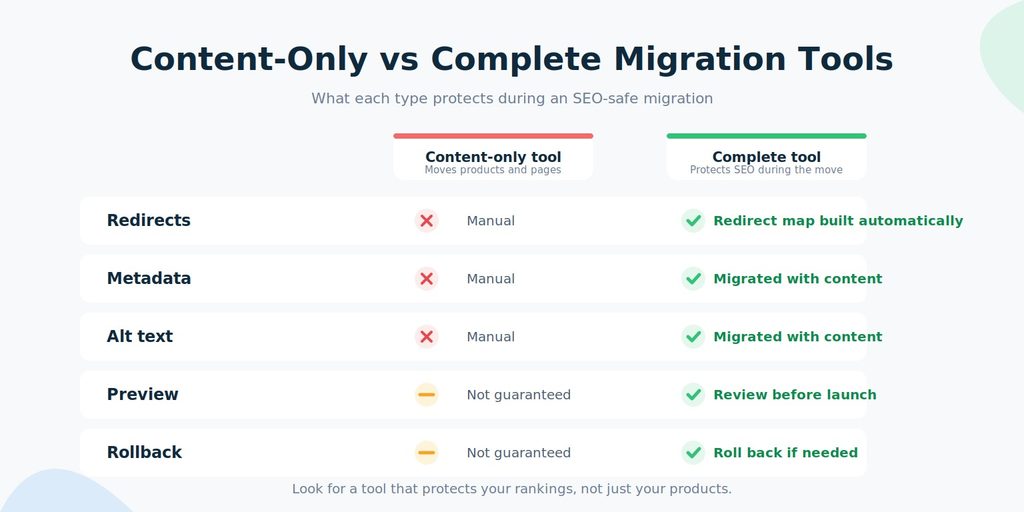
Most migration tools are built to copy data, and for ecommerce that usually means products. Redirects, metadata, alt text, and order history become your problem afterward, even though the tool already knows both the old URL and the new one it just created. Look for a tool that builds the redirect map automatically, migrates SEO data with your content, lets you preview first, and offers a way to roll back. Tools with built-in 301 redirect mapping and SEO data migration turn the playbook above into a verification exercise instead of a rebuild.
Final Thoughts
Migrations do not wreck SEO on their own. Skipped steps do. Benchmark, map every URL, test, carry the signals across, launch deliberately, and monitor closely. If you have recently acquired a store and are planning a platform change, Designs Valley’s guide on what U.S. buyers need to know about ecommerce businesses for sale is a useful companion for the business side of the decision.
FAQ: Site Migrations and SEO
Will a site migration hurt my rankings?
Not necessarily. Ranking drops come from execution problems such as missing redirects, lost metadata, or a leftover noindex tag, not from the move itself. A well-planned migration can hold most of its rankings.
How long does it take rankings to recover?
For a properly redirected migration, rankings typically stabilize within about four to eight weeks. Short-term fluctuation is normal while Google recrawls the new URLs.
Do I need to redirect every single URL?
Yes. Any indexed page, including older blog posts, can carry rankings and backlinks. Redirect each one to its closest new equivalent rather than sending everything to the homepage.
When should I use Google’s Change of Address tool?
Only when your domain or subdomain changes. It requires both properties to be verified in Search Console and does not replace 301 redirects, which must already be in place.
Do most migration tools handle SEO automatically?
No. Most migration tools focus on moving content or products and leave redirects and metadata for you to handle manually. Before choosing one, check that it builds your redirect map and migrates SEO data as part of the migration.


