

SEO involves many different decisions. You may need to find topics worth targeting, understand why a page is not performing, identify technical problems, research competitors, monitor rankings, evaluate backlinks, improve content, or measure what is happening in Google Search.
Because these jobs are different, the best SEO tools are not necessarily the tools with the biggest feature lists. A platform that is excellent for backlink research may be unnecessary for a blogger who mainly needs keyword research. Likewise, an agency may need reporting and project management features that a small business never uses.
The better question is not, “Which SEO tool is the best?”
It is:
“Which tool gives me the right information for the SEO problem I am trying to solve?”
This guide takes a practical approach to SEO software. Instead of simply listing dozens of platforms, it explains the major types of SEO tools, what to evaluate, which capabilities matter for different tasks, how free and paid options compare, and how to create a focused tool stack.
The goal is to help you choose software based on your website, objectives, workflow, and budget—not popularity alone.
What Are SEO Tools?
SEO tools are software platforms and resources that help website owners, marketers, content teams, and SEO professionals research, analyze, monitor, audit, and improve organic search performance.
Some tools focus on one specific activity. Others combine multiple functions such as keyword research, competitor analysis, rank tracking, backlink research, and website auditing.
A typical SEO workflow can use tools for six broad purposes.
Research
Research tools help discover keywords, topics, competitors, content opportunities, and search trends.
Analysis
Analysis tools help interpret website performance, competitor visibility, backlinks, rankings, content, and technical information.
Monitoring
Monitoring tools help track changes over time, such as keyword positions, search traffic, technical health, or organic visibility.
Auditing
Auditing tools crawl or inspect websites to identify issues involving links, redirects, indexability, canonicals, sitemaps, duplicate pages, and other technical elements.
Content Optimization
Content-focused tools can help writers understand topics, search intent, content structure, related concepts, and potential gaps.
Reporting
Reporting tools turn SEO information into organized reports that can be reviewed by website owners, managers, clients, or teams.
However, an important distinction should always be remembered:
An SEO tool provides information; it does not make the SEO decision for you.
A keyword database can estimate search demand, but it cannot fully understand your business. A technical crawler can identify a warning, but it cannot automatically determine whether that issue deserves immediate attention. A rank tracker can report a position change, but the number alone does not explain why the change happened.
Good SEO combines software with human analysis.
What Should You Look for in an SEO Tool?
The right software should fit your actual workflow. Before choosing a platform, evaluate the following factors.
Accuracy
SEO decisions depend on data, so reliability matters.
Different platforms collect and process information differently. Keyword estimates, backlink databases, ranking information, and competitor metrics can therefore vary.
Instead of expecting every platform to produce identical numbers, ask whether its data is sufficiently useful for the decisions you need to make.
Data Coverage
Check whether the tool covers the markets that matter to you.
Depending on your website, you may need:
- Specific countries
- Local search locations
- Desktop and mobile results
- Different search engines
- Multiple languages
- Large keyword sets
- Multiple websites
A tool with excellent features can still be a poor choice if its data does not cover your target market.
Ease of Use
A powerful platform should not create unnecessary complexity.
Look for logical navigation, understandable dashboards, useful filters, and reports that make information easier to interpret.
Reporting
Reporting matters when SEO work involves clients, managers, or multiple team members.
Consider whether the tool supports historical comparisons, exports, customizable reports, project organization, and clear presentation of important findings.
Integrations
Integrations can connect SEO data with the rest of your workflow.
Depending on your needs, integrations with analytics, search-performance tools, content systems, spreadsheets, or reporting platforms may save time.
Automation
Automation can be useful for recurring activities such as scheduled crawls, ranking checks, alerts, and reports.
But automation should reduce repetitive work—not encourage people to follow every automated recommendation without checking its context.
Scalability
Consider how the tool will perform as your SEO operation grows.
A simple platform may be ideal for one website. A larger organization may eventually need multiple projects, larger keyword sets, deeper crawling, additional users, or more advanced reporting.
Pricing
Look beyond the headline subscription price.
Consider which features you actually need, how many projects or keywords are included, and whether you are paying for capabilities that will remain unused.
Learning Curve
Some platforms are designed for beginners, while others expose extensive datasets and advanced workflows.
The best choice is not necessarily the most sophisticated tool. It is the tool your team can learn and use effectively.
Support and Documentation
Good documentation and support can become valuable when a tool is integrated into an ongoing SEO process.
Before subscribing, consider whether you can find enough educational material to understand the platform and interpret its reports correctly.
Types of SEO Tools
| Tool type | Main purpose | Typical user |
| Keyword research | Discover search opportunities | SEO professionals/content teams |
| Rank tracking | Monitor rankings | SEO professionals/businesses |
| Site auditing | Find technical issues | Website owners/SEOs |
| Backlink analysis | Study links | Link builders/SEOs |
| Content optimization | Improve content | Writers/editors |
| Competitor research | Analyze competitors | Marketers/SEOs |
| Search performance | Monitor organic results | Website owners |
| Local SEO | Manage local visibility | Local businesses |
| Reporting | Create SEO reports | Agencies/teams |
These categories overlap in many modern platforms.
That overlap can be useful, but it can also create unnecessary costs. If two tools perform essentially the same job, having both may not improve your SEO process.
Best SEO Tools by SEO Task
The most useful way to evaluate SEO software is to start with the task.
Best Tools for Keyword Research
Keyword research tools help you discover queries and topics that may be relevant to your audience.
Important capabilities include:
- Search volume estimates
- Keyword difficulty
- Search intent
- Related terms
- Parent topics
- Long-tail opportunities
- SERP analysis
- Keyword variations
Search Volume
Search volume can help estimate how often a term is searched, but it should not be treated as a guarantee of traffic.
A highly relevant keyword with modest search demand can be more valuable to a business than a broad term with greater estimated volume.
Keyword Difficulty
Difficulty metrics can help compare competitive terms, but they are tool-specific measurements.
Do not assume a particular difficulty score means Google considers a keyword easy or difficult.
Search Intent
Intent is one of the most important parts of keyword research.
A query may indicate that the user wants:
- An explanation
- A comparison
- A product
- A service
- A tutorial
- A specific website
- A local business
The page you create should match what users are actually looking for.
Related Terms and Parent Topics
Related queries can reveal the broader subject surrounding a keyword.
This can help you build comprehensive content rather than creating a separate page for every minor variation.
Long-Tail Opportunities
Long-tail searches can be useful when users have a specific question or requirement.
These queries may help smaller websites identify focused topics that are closely aligned with their audience.
The strongest keyword workflow combines software data with SERP analysis and genuine understanding of the target audience.
Best Tools for Technical SEO
Technical SEO tools help inspect the structure and accessibility of a website.
Useful capabilities include:
- Crawling
- Broken-link detection
- Redirect analysis
- Indexability checks
- Canonical checks
- XML sitemap analysis
- Duplicate-page detection
- Internal-link analysis
- Page-performance checks
A crawler is especially useful when a website contains many pages and manual inspection is impractical.
However, an audit report should not become a checklist where every warning receives equal priority.
A useful audit distinguishes between:
Critical problems → Important improvements → Minor recommendations
The priority should depend on the actual effect on crawling, indexing, usability, site structure, and search accessibility.
Best Tools for Backlink Analysis
Backlink tools help investigate links pointing toward websites.
Useful capabilities include:
- Referring domains
- Backlink discovery
- Anchor-text analysis
- Competitor backlink research
- Link history
- Link-quality investigation
Backlink databases are not identical. One platform may discover a link that another has not recorded.
For that reason, backlink numbers should be interpreted as database measurements rather than complete representations of the entire web.
Backlink analysis is most useful when it helps answer practical questions:
- Who links to competitors?
- Which pages attract links?
- What types of websites link within this industry?
- Which content assets appear to attract references?
- Are there relevant link opportunities worth investigating?
Best Tools for Rank Tracking
Rank tracking helps monitor where selected pages appear for particular search queries.
Important capabilities include:
- Keyword positions
- Location tracking
- Desktop/mobile differences
- Historical trends
- SERP features
- Competitor comparisons
- Ranking alerts
Location can matter considerably for local SEO. Device type can also affect the search experience.
Historical data is especially useful because a single ranking snapshot provides limited context.
Instead of asking only, “What position are we in today?” a better question is:
“How has our visibility changed, and what happened around the time it changed?”
Rank tracking should also be combined with clicks, impressions, conversions, and other meaningful business metrics.
Best Tools for Content Optimization
Content optimization software can help writers and editors analyze a page before or after publication.
Useful capabilities may include:
- Content structure
- Search intent
- Topic coverage
- Readability
- Keyword relevance
- Related concepts
- Competitor content analysis
The objective should not be to maximize a content score.
A page with a high software score can still be unhelpful if it does not answer the user’s question.
Use content tools to identify missing ideas, improve structure, and understand the subject. Then edit the content for clarity, usefulness, accuracy, and audience needs.
Best Tools for Competitor Research
Competitor research tools help you understand the organic-search landscape.
You may use them to investigate:
- Competitor keywords
- Content gaps
- Backlinks
- Organic visibility
- Top pages
- SERP competition
Competitor research is most valuable when it generates questions and opportunities.
For example:
- Are competitors covering an important topic that your website has ignored?
- Are there search intents they are not addressing well?
- Which content formats appear repeatedly in the SERPs?
- Which pages attract links or visibility?
- Where can your website provide a better answer?
The goal is not to copy a competitor. It is to understand the market and find opportunities to create something useful.
Free SEO Tools vs Paid SEO Tools
| Factor | Free tools | Paid tools |
| Cost | Usually free | Subscription or paid |
| Data depth | Often limited | Usually broader |
| Advanced research | May be limited | More extensive |
| Reporting | Basic to moderate | Often advanced |
| Best for | Beginners/specific tasks | Professionals/teams |
Free tools can be surprisingly valuable.
They are especially useful for beginners, small websites, one-off investigations, and website owners who only need a few specific capabilities.
Paid platforms may become more useful when you need:
- Larger datasets
- Extensive competitor research
- Advanced backlink analysis
- Historical data
- Automated monitoring
- Multiple projects
- Advanced reporting
- Team workflows
However, free does not automatically mean poor, and paid does not automatically mean better.
If a free resource answers your question accurately enough, there may be no reason to purchase another platform simply because it is paid.
Best SEO Tools for Different Users
Different users have different requirements.
Beginners
Beginners should prioritize simplicity.
A basic combination of keyword research, search-performance monitoring, and technical diagnostics can provide a strong learning environment without overwhelming the user.
Bloggers
Bloggers often need:
- Keyword discovery
- Topic research
- Content analysis
- Search-performance monitoring
Advanced agency reporting may be unnecessary.
Small Businesses
Small businesses generally need practical tools for:
- Keyword research
- Local visibility
- Technical checks
- Search performance
- Affordable monitoring
The focus should be on useful information rather than the largest possible software stack.
SEO Consultants
Consultants often require deeper research across several areas, including:
- Keyword analysis
- Competitor research
- Technical auditing
- Backlink analysis
- Rank tracking
- Reporting
Agencies
Agencies need scalable workflows for multiple clients.
Project management, client reporting, rank tracking, competitor analysis, backlink research, user access, and automation can become particularly important.
E-commerce Websites
E-commerce websites often have large numbers of product and category pages.
Useful capabilities can include:
- Product keyword research
- Category research
- Technical crawling
- Internal-link analysis
- Search-performance monitoring
- Content optimization
- Structured-data checks
WordPress Website Owners
WordPress users may use a combination of plugins and external platforms.
One tool may handle on-page settings while another handles crawling, competitor research, backlinks, rankings, or search-performance analysis.
The right combination depends on the website’s complexity.
Best SEO Tools for Small Businesses
Small businesses should generally avoid unnecessary complexity.
A practical SEO setup should help answer four questions:
- What should the business target?
- Can search engines access the website properly?
- How is the website performing in organic search?
- Where are the most valuable opportunities?
Local visibility is also important when customers search for services or businesses in specific areas.
If you are comparing tools specifically for smaller organizations, see SEO software choices for smaller companies.
The best small-business stack is usually the one that the business can understand, afford, and use consistently.
Best SEO Tools for Agencies
Agencies need to think beyond individual SEO tasks.
A suitable agency platform may need to support:
- Multiple projects
- Multiple users
- Client reporting
- Rank tracking
- Competitor analysis
- Backlink research
- Historical data
- Data exports
- Automation
- Scalable workflows
Reporting deserves special attention.
Clients usually do not need a massive spreadsheet containing every available metric. They need to understand what changed, why it matters, what was done, and what should happen next.
When comparing agency-focused SEO platforms, evaluate how well each platform supports that complete workflow.
Best SEO Tools for WordPress Websites
WordPress websites can use SEO tools at several levels.
On-Page SEO
WordPress SEO plugins can help manage titles, descriptions, canonical settings, XML sitemaps, and other page-level configurations.
Technical SEO
External crawlers can provide broader website-level analysis that may be difficult to perform from inside WordPress alone.
Site Health
Website owners should monitor technical and performance-related problems that could affect usability or accessibility.
XML Sitemaps
SEO tools can help inspect whether important URLs are included appropriately and whether sitemap-related issues exist.
Performance
Performance tools can help identify opportunities involving page loading and user experience.
Content Optimization
Content tools can support research, structure, topic coverage, and relevance.
For a dedicated comparison, explore WordPress-focused SEO solutions.
Avoid installing several plugins or platforms simply because each offers a similar SEO feature. Overlapping functionality can create unnecessary complexity.
Free SEO Tools Worth Considering
Free resources can cover many foundational SEO needs.
They can be useful for:
- Keyword research
- Search-performance analysis
- Technical checks
- Website diagnostics
- Basic competitor research
They are also useful for testing an SEO workflow before investing in paid software.
For a dedicated overview, explore no-cost tools for SEO research.
When evaluating a free tool, ask what data it actually provides, how current the information is, what limitations apply, and whether the output is enough for the decision you are trying to make.
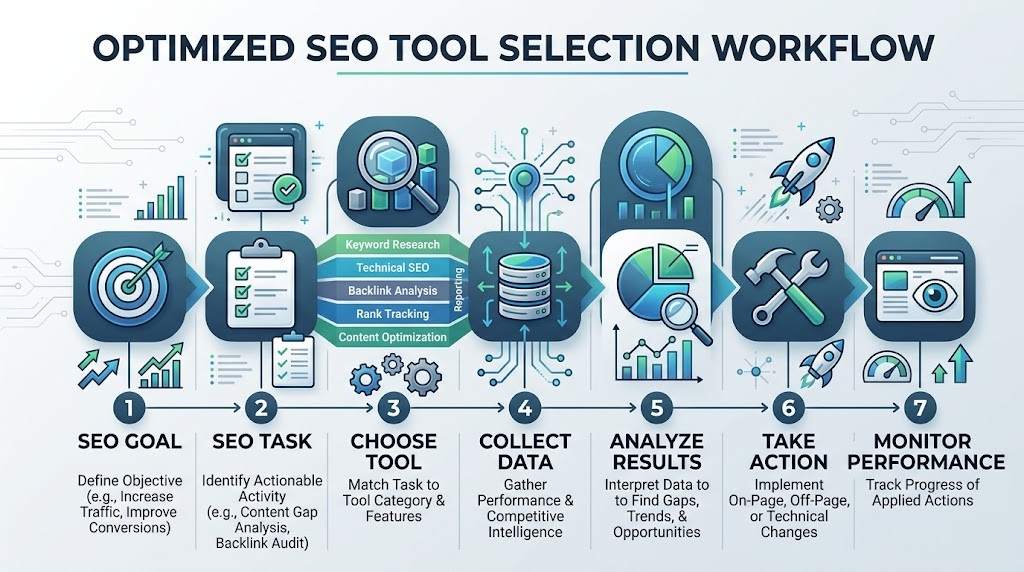
How to Build an SEO Tool Stack
A good SEO tool stack should be built from the workflow outward—not from software inward.
Step 1: Define the SEO Goal
Start with the result you want to improve.
For example:
- Increase relevant organic visibility
- Improve local visibility
- Fix technical problems
- Build a content strategy
- Understand competitors
- Improve organic conversions
Step 2: Identify the Task
Translate the goal into a specific activity.
For example, if organic performance has declined, you may need search-performance analysis before purchasing another keyword tool.
Step 3: Choose the Minimum Tool Needed
Select the simplest resource capable of answering the question.
Do not buy advanced software simply because it has more features.
Step 4: Test the Data
Where practical, compare important findings with another trustworthy source.
Different platforms can produce different results because their databases and methodologies differ.
Step 5: Compare Results
Look for meaningful patterns instead of becoming obsessed with individual numbers.
Step 6: Create a Repeatable Workflow
Turn useful actions into a process.
A simple workflow could be:
Research → Create → Audit → Publish → Monitor → Improve
Step 7: Add Advanced Tools Only When Necessary
As your website or business grows, you may need deeper crawling, larger keyword datasets, more projects, more users, or advanced reporting.
Add those capabilities when the need actually appears.
Step 8: Review Costs Regularly
SEO software should earn its place in your workflow.
If a tool is rarely used, duplicates another platform, or provides information that never affects your decisions, reconsider the subscription.
More software does not automatically mean better SEO.
How Google Search Data Fits Into an SEO Toolset
Third-party SEO platforms can provide estimates, research databases, competitive information, and specialized analysis. But website owners should also pay attention to first-party search data.
Google Search Console’s Performance report provides information about how a verified website performs in Google Search, including clicks, impressions, click-through rate, and average position. It can also be analyzed by dimensions such as queries, pages, countries, devices, search appearance, and dates.
This makes Search Console valuable because it provides information about your own website’s search performance rather than relying solely on third-party estimates.
For example, you can investigate which queries generate impressions, which pages receive clicks, and where search performance has changed over time. Google also provides guidance for using filters and comparisons when investigating changes.
Read ways to measure Google Search traffic and performance to understand how Search Console fits into an SEO workflow.
Search Console does not replace every SEO platform.
It is not intended to provide the same breadth of competitor databases, backlink discovery, keyword research, or third-party crawling capabilities that specialist tools can offer.
Think of it as an important first-party data source within a wider SEO system.
Google Search Documentation for SEO Research
Third-party SEO software can make research easier, but website owners should understand the fundamentals behind search optimization as well.
Google Search Central provides official documentation covering SEO fundamentals, crawling, indexing, search appearance, and other aspects of Google Search.
This matters because automated software recommendations are based on the methodology of the individual platform.
A tool may recommend changing a page because of its own content score, technical threshold, or internal calculation. That recommendation should be evaluated rather than followed automatically.
For foundational guidance, read Google’s documentation for improving search visibility.
Official documentation can provide the broader context needed to interpret recommendations from third-party SEO software.
Google Recommendations for Search-Friendly Websites
A search-friendly website is about more than achieving a high SEO score.
Website owners should think about whether important pages can be discovered, whether content is useful and accessible, whether technical requirements are satisfied, and whether the website follows applicable search policies.
Google’s Search Essentials cover technical requirements, spam policies, and key best practices for websites appearing in Google Search.
You can review Google’s recommendations for search-friendly websites when evaluating your SEO workflow.
The principle is simple:
Use tools to find information. Use judgment to decide what to do with it.
Common Mistakes When Choosing SEO Tools
Buying Too Many Tools
Multiple subscriptions can create unnecessary costs and duplicate information.
Start with the core tasks.
Choosing Based Only on Popularity
A well-known platform may not fit your website, market, budget, or skill level.
Focusing Only on Keyword Difficulty
Difficulty is only one measurement.
Consider relevance, intent, competition, business value, and your ability to create genuinely useful content.
Ignoring Data Quality
Different tools can produce different numbers.
Understand what a metric represents before using it as the basis for an important decision.
Treating Tool Scores as Google Rankings
An SEO health score, authority metric, content score, or keyword difficulty value is generated by the tool.
It should not be treated as an official Google ranking score.
Ignoring Search Intent
A keyword database cannot replace reviewing the actual search results.
Before creating a page, understand what type of content users appear to want.
Paying for Unused Features
If you use only one or two features from a large platform, a simpler solution may be more appropriate.
Using Multiple Tools for the Same Task
Some overlap can help validate important findings, but excessive duplication often makes the workflow slower and more confusing.
How to Choose the Best SEO Tool for Your Website
Your main SEO objective should determine the type of software you choose.
If your main goal is keyword research:
Choose software with strong keyword discovery, related terms, SERP research, search-intent analysis, and long-tail opportunities.
If your main goal is technical SEO:
Choose a crawler or auditing solution capable of examining crawling, indexability, redirects, canonicals, broken links, internal linking, and sitemaps.
If your main goal is content:
Choose a tool that helps with topic research, search intent, content structure, relevance, and topic coverage.
If your main goal is link building:
Choose software with useful backlink discovery, referring-domain data, anchor-text analysis, and competitor backlink research.
If your main goal is reporting:
Choose a platform with historical data, clear reporting, exports, project organization, and the ability to present meaningful findings.
The best tool is therefore determined by the job.
SEO Tools Checklist
Before choosing an SEO platform, review this checklist:
- Define the SEO goal.
- Identify the exact SEO task.
- Check data quality.
- Confirm relevant market and data coverage.
- Compare only the features you actually need.
- Check usability.
- Review integrations.
- Consider scalability.
- Calculate the real cost.
- Test the platform when possible.
- Check reporting requirements.
- Review whether it reduces manual work.
- Determine whether its data actually changes your decisions.
- Reassess the tool periodically.
If a tool does not improve your workflow, provide useful information, or support a meaningful SEO decision, having it may not be worthwhile.
Frequently Asked Questions
What are the best SEO tools?
There is no single best SEO tool for every website. The right choice depends on the SEO task. Keyword research, technical auditing, backlink analysis, rank tracking, content optimization, competitor research, and search-performance monitoring all require different capabilities.
Which SEO tools are best for beginners?
Beginners should generally choose tools that are easy to understand and provide useful information without unnecessary complexity. Basic keyword research, search-performance monitoring, and technical diagnostics are useful starting points.
Are free SEO tools good enough?
They can be. Free tools can handle many foundational SEO tasks, particularly for beginners and smaller websites. Paid software becomes more useful when advanced research, larger datasets, automation, historical information, or multi-project workflows are required.
What SEO tools do professionals use?
Professionals commonly combine tools for keyword research, crawling, backlink analysis, competitor research, rank tracking, content analysis, search-performance monitoring, and reporting. The exact stack varies according to the project.
Which SEO tools are best for keyword research?
Look for strong keyword discovery, related terms, SERP information, search-intent insights, long-tail opportunities, and useful filtering. The best platform is the one that provides enough data for your specific research process.
Which SEO tools are best for technical SEO?
A strong crawler or technical auditing platform is generally the most useful starting point. It should help identify problems involving crawling, indexability, redirects, canonicals, broken links, internal links, and sitemaps.
How many SEO tools do I need?
There is no fixed number. A small website may need only a few resources, while an agency may need several specialized platforms. Start with the minimum and add tools when a genuine requirement appears.
Are paid SEO tools worth it?
They can be worthwhile when their data, automation, research capabilities, or reporting features save time or improve decision-making. But paying for a platform does not automatically make an SEO workflow better.
Conclusion
The best SEO tools are not necessarily the most expensive, most popular, or most feature-heavy platforms.
The right choice depends on the website, SEO objective, task, experience level, budget, data requirements, and workflow.
Keyword tools can help discover opportunities. Technical crawlers can uncover website problems. Backlink platforms can support link research. Rank trackers can monitor visibility. Content tools can assist with topic and page analysis. Search Console can provide first-party information about how a website performs in Google Search.
But software cannot replace judgment.
SEO tools provide data, estimates, alerts, and recommendations. People still need to interpret those findings, understand search intent, prioritize problems, consider business goals, and decide what action makes sense.
A focused SEO tool stack is therefore usually more practical than a collection of overlapping subscriptions.
Start with the problem you want to solve. Choose the minimum tool capable of helping with that problem. Test the data, build a repeatable workflow, measure the results, and add more advanced software only when the need becomes clear.
That is a more sustainable way to use SEO software—and a better way to turn SEO data into useful decisions.


