

Starting SEO can feel confusing. Search for SEO software and you will quickly find tools for keyword research, rankings, backlinks, technical audits, content research, competitors, website performance, and much more.
For someone new to SEO, that can create the impression that successful optimization requires a large collection of expensive platforms.
It doesn’t.
The best SEO tools for beginners are not necessarily the ones with the most features. They are the tools that help you answer important questions about your website: What are people searching for? Can search engines find my pages? How are my pages performing? Are there technical problems? Does my content match what people want?
The key is to understand what each type of tool does and when you actually need it. Tools can make SEO research and monitoring easier, but they do not replace human judgment. A useful SEO process is simple: identify a problem, gather information, make a decision, take action, and measure what happens.
Table of Contents
- What Are SEO Tools?
- Do Beginners Really Need SEO Tools?
- The Main Types of SEO Tools Beginners Should Know
- Keyword Research Tools for Beginners
- Search Performance Tools Beginners Should Learn
- Website Audit Tools for Beginners
- On-Page SEO Tools for Beginners
- Rank Tracking Tools for Beginners
- Backlink Tools for Beginners
- SEO Tools for Beginners Working With WordPress
- Free SEO Tools Beginners Can Start With
- SEO Tools for Beginners Running Small Businesses
- When Should Beginners Start Using Paid SEO Tools?
- How to Choose Your First SEO Tool
- A Simple SEO Toolkit for Beginners
- Common SEO Tool Mistakes Beginners Make
- How to Use SEO Tools Without Becoming Dependent on Them
- Google Resources Beginners Should Learn
- Understanding Search Data as a Beginner
- Creating Helpful Pages With SEO Tools
- Beginner SEO Tools Checklist
- Frequently Asked Questions
- Conclusion
What Are SEO Tools?
SEO tools are software platforms and services that help website owners research, analyze, monitor, and improve different parts of search engine optimization.
Depending on the tool, you might use it to:
- Find keywords and related topics
- Understand search intent
- Check website health
- Identify technical problems
- Monitor search performance
- Research competitors
- Improve page structure and content
- Track selected keyword rankings
- Research backlinks
- Check website performance
Some tools focus on one specific task, while others combine several SEO functions in one platform.
For beginners, however, the number of features is not the most important consideration. What matters is whether you understand why you are using the tool and what decision its information will help you make.
For example, a keyword research tool can help you discover search queries, but it cannot decide whether a topic is genuinely useful for your audience. A website audit can identify a possible technical problem, but you still need to determine whether the issue affects your website and how it should be addressed.
Do Beginners Really Need SEO Tools?
You can learn many SEO fundamentals without buying expensive software.
Manual search-result research, website reviews, content analysis, official documentation, and first-party search data can teach you a great deal. Tools become valuable when they make a task faster, easier, more organized, or more measurable.
Consider search performance. You could manually search for your website every day, but that would not give you a reliable picture of overall performance. A search performance platform can organize information about clicks, impressions, queries, pages, and other useful dimensions.
The important distinction is:
Tools provide information. People make SEO decisions.
This mindset can prevent a common beginner mistake: treating every score, recommendation, or keyword estimate as an instruction.
Instead, use tool data as evidence. Investigate it, compare it with what you see on the website and in search results, and then decide what action makes sense.
The Main Types of SEO Tools Beginners Should Know
| Tool type | What it helps with | Beginner use |
|---|---|---|
| Keyword research | Find search queries | Plan relevant content |
| Search performance | Understand search visibility | Monitor results |
| Site audit | Find technical problems | Check website health |
| Content tools | Research topics and opportunities | Plan useful pages |
| Rank tracking | Monitor selected keywords | Observe trends |
| Backlink tools | Research links | Understand link profiles |
| Performance tools | Check technical performance | Find page issues |
| Local SEO tools | Research local visibility | Support local businesses |
You do not need to learn every category at the same time. Start with the tools that solve the most important problem you currently have.
Keyword Research Tools for Beginners
Keyword research is the process of discovering the words and phrases people use when searching online.
A keyword is simply a search query or phrase. For example, someone might search for “how to improve website SEO” or “SEO tools for beginners.”
Keyword research is more useful when you look beyond search volume and consider what the searcher actually wants.
Search intent
Search intent describes the reason behind a search.
Someone searching for “what is SEO” is probably looking for an explanation. Someone searching for “SEO consultant for small business” may be researching a service.
These searches require different types of content. Understanding intent helps you create a page that matches the searcher’s actual need.
Long-tail keywords
Long-tail keywords are more specific search phrases, often containing several words.
For example, “SEO” is extremely broad, while “how to check if a website is indexed” gives you a much clearer indication of what the searcher wants.
Specific searches can also help beginners understand the questions and problems their audience is trying to solve.
Search volume
Search volume is an estimate of how frequently a keyword is searched.
It can be useful during research, but it should not be treated as a guarantee of traffic. A keyword with high estimated volume may still be a poor choice if it is unrelated to your website or does not match your audience.
Competition
Competition metrics attempt to estimate how difficult it may be to compete for a particular search query.
Different tools calculate these metrics differently, so treat them as estimates rather than absolute measurements.
Related searches
Related searches can reveal alternative wording, questions, and connected topics. They can help you understand a subject more completely and discover content ideas you may have overlooked.
A simple beginner workflow is:
Seed keyword → Related ideas → Search intent → Competition → Select a relevant topic
The final decision should be based on relevance and usefulness, not search volume alone.
Search Performance Tools Beginners Should Learn
Search performance tools help you understand what happens after your pages become visible in Google Search.
For beginners, Google Search Console is particularly useful because it provides first-party information about how your website performs in Google Search.
Important metrics include:
- Impressions: How often your site appeared in search results
- Clicks: How often users clicked your result
- CTR: Click-through rate based on clicks and impressions
- Average position: An aggregated position metric
- Queries: Search terms associated with your site’s visibility
- Pages: URLs receiving search visibility
Search data can also be examined by dimensions such as queries, pages, countries, devices, and dates.
This can reveal opportunities that keyword research alone cannot.
For example, an existing page may receive impressions for related searches that you did not originally target. Looking at those queries can help you understand how people are discovering your content and whether the page could better address their needs.
Don’t judge performance from a single number. Look for meaningful patterns over time.
Website Audit Tools for Beginners
A website audit examines different technical and structural aspects of a website.
Beginners can use audit tools to investigate issues such as:
- Broken links
- Indexing problems
- Redirect issues
- Missing metadata
- Sitemap problems
- Mobile usability concerns
- Pages that may be difficult for search engines to access
Automated audits are useful because they can examine many pages much faster than a manual review.
However, an audit score should not be treated as a Google ranking score.
If a platform gives your website a numerical health score, that number reflects the platform’s own methodology. It does not mean Google has assigned your website the same score.
Beginner action
When an audit identifies an issue, don’t immediately try to fix everything. First verify the problem, understand what caused it, and determine whether it is important for your website.
This keeps an audit from becoming a long list of technical warnings with no clear priorities.
On-Page SEO Tools for Beginners
On-page SEO involves improving individual pages so they are clear, useful, well organized, and aligned with their intended search.
Common areas include:
- Page titles
- Meta descriptions
- Headings
- Internal links
- Content structure
- Image alt text
- Search intent
- Topic coverage
On-page tools can identify missing elements and provide suggestions for improving a page.
But software cannot determine everything that makes content genuinely helpful.
For example, a tool may suggest using a particular keyword more frequently. Repeating that phrase throughout the page could make the writing unnatural without adding useful information.
Use on-page tools as editing assistance rather than as a formula for writing.
Beginner action
Review the page yourself after using the tool. Ask whether the title accurately describes the page, whether the headings make the content easy to navigate, whether internal links help readers, and whether the page actually answers the searcher’s question.
Rank Tracking Tools for Beginners
Rank tracking means monitoring where a webpage appears for selected search queries over time.
It can help you identify trends, but rankings are not fixed numbers.
Search results can vary because of factors such as:
- Location
- Device
- Search context
- Time
- Changes in search results
- Changes to your website
- Changes to competing pages
For that reason, checking rankings repeatedly throughout the day is rarely useful.
Instead, monitor rankings over meaningful periods and compare them with impressions and clicks.
A keyword moving up or down can provide useful context, but it does not tell the entire SEO story. A page that gains impressions and clicks may be making useful progress even if its average position changes only slightly.
Backlink Tools for Beginners
A backlink is a link from another website to your website.
Backlink research tools can help you understand:
- Which websites link to your site
- Which pages receive links
- Referring domains
- Anchor text
- Link relevance
- Competitor link patterns
A referring domain is a website that contains one or more links pointing to your website.
Anchor text is the clickable text used for a link.
For beginners, relevance is more important to understand than simply counting links.
Avoid building an SEO strategy around buying random backlinks or collecting links purely for quantity. A large number of irrelevant links does not automatically create useful visibility.
Instead, use backlink tools to understand your existing link profile, research relevant websites, and identify patterns that may help you understand your market.
SEO Tools for Beginners Working With WordPress
WordPress provides a convenient environment for managing many SEO-related tasks, but website owners still need to understand what their settings do.
Common WordPress SEO tasks include:
- Managing metadata
- Checking sitemaps
- Reviewing indexability
- Improving content structure
- Managing redirects
- Checking technical issues
- Reviewing page performance
An SEO plugin can simplify some of these tasks, but installing a plugin does not automatically optimize a website.
If you are using WordPress and want to learn more about beginner-friendly WordPress SEO tools, see our WordPress SEO tools guide.
The important step is to understand the SEO problem first and then use the appropriate WordPress feature or tool to address it.
Free SEO Tools Beginners Can Start With
You can learn many SEO fundamentals without paying for advanced software.
Free resources can help with basic keyword research, search performance monitoring, manual search-result research, website checks, and SEO education.
Starting with free resources also gives you time to understand your workflow before spending money on additional software.
If you want to explore free SEO tools for getting started, our free SEO tools guide provides a separate overview.
The goal is not to avoid paid software forever. Instead, learn what information you actually need before paying for additional data, automation, or larger-scale research.
SEO Tools for Beginners Running Small Businesses
Small businesses usually do not need a complicated SEO technology stack.
A practical starting toolkit can cover:
- Keyword research
- Local search research
- Website auditing
- Search performance
- Content planning
A local business may need to understand searches involving its services and location. It may also need to check whether important business information is easy for potential customers to find.
If your SEO workload is limited, choose tools that answer important questions without creating unnecessary complexity.
For a more focused approach, see our guide to SEO tools for small business beginners.
When Should Beginners Start Using Paid SEO Tools?
There is no universal point at which every beginner should purchase SEO software.
Paid tools can become useful when:
- A website becomes larger
- More keywords need monitoring
- Competitor research becomes important
- Multiple websites are managed
- Reporting requirements increase
- More detailed datasets are needed
- Repetitive research takes too much time
The decision should be based on your actual workflow.
If a free resource answers your current question, there may be no reason to upgrade. If a paid platform provides information or automation that solves a real problem, it may become worthwhile.
Don’t buy software simply because it has more features. Buy or subscribe when those features solve a problem you actually have.
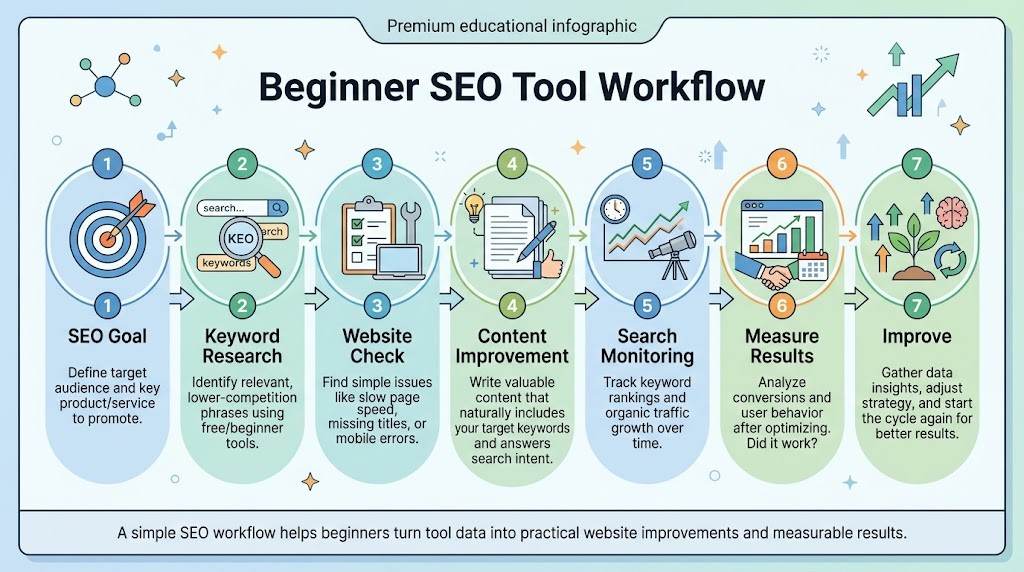
How to Choose Your First SEO Tool
A simple framework can prevent beginners from becoming overwhelmed.
1. Identify your SEO goal
Start by deciding what you are trying to understand or improve.
Are you researching a topic? Checking a technical issue? Measuring search performance? Improving an existing page?
2. Find the information you need
Determine what information would help you make the decision.
You might need keywords, search performance data, technical information, rankings, content ideas, or backlink information.
3. Choose the simplest tool that provides it
Avoid paying for complexity you do not yet need.
4. Learn one tool at a time
Become comfortable with the reports and functions you actually use instead of trying to master an entire platform.
5. Apply the information
Research becomes useful only when it leads to an action.
6. Measure the result
After making an improvement, review what changed over an appropriate period.
7. Add another tool only when necessary
Expand your toolkit when a new SEO problem requires additional information.
If you later need a broader overview of SEO software categories, use this SEO tool guide for choosing the right platform.
A Simple SEO Toolkit for Beginners
You can think about your SEO toolkit in three stages.
Level 1 — Starting Out
Start with:
- Basic keyword research
- Search performance monitoring
- Basic website checks
At this stage, the main goal is to understand how SEO works and become comfortable interpreting basic data.
Level 2 — Growing
Add:
- Content research
- Rank tracking
- Deeper technical auditing
This becomes useful when you publish regularly and want to monitor your work more systematically.
Level 3 — Advanced
Add:
- Competitor research
- Backlink analysis
- Reporting
- Automation
Most beginners do not need to start here.
A larger collection of software does not automatically produce better SEO decisions. More tools only become useful when they solve additional problems.
Common SEO Tool Mistakes Beginners Make
Using too many tools
Opening several dashboards can create more confusion than insight. Start with the tools that answer your most important questions.
Buying expensive software too early
Advanced data can be difficult to use effectively if you have not yet learned the fundamentals.
Chasing keyword volume
A high-volume search term is not automatically the right topic for your website.
Trusting automated scores
An SEO score is an indicator created by a particular tool, not a direct measurement of Google’s ranking systems.
Ignoring search intent
A page can contain relevant keywords and still fail to answer what the searcher actually wants.
Checking rankings constantly
Short-term fluctuations can distract you from meaningful trends.
Copying competitor keywords
Competitor research can reveal opportunities, but your content should be developed around your own audience, expertise, and goals.
Focusing only on backlinks
Links are one part of SEO, not the entire process.
Ignoring technical problems
Content quality matters, but technical problems can also affect how search engines access and understand a website.
Using tools without taking action
Reports and dashboards are not the end goal. The purpose of SEO tools is to help you make better decisions and improve the website.
How to Use SEO Tools Without Becoming Dependent on Them
The most important concept for a beginner is:
Tool data → Human analysis → SEO decision → Implementation → Measurement
Imagine that a keyword tool identifies a promising topic.
The tool provides an idea.
You review the search results and determine the intent.
You decide whether the topic is relevant to your audience.
You create or improve the page.
Later, you review search performance and other appropriate signals.
This process keeps software in its proper role.
The tool helps you collect and organize information. You are still responsible for interpreting that information and deciding what to do.
That approach also makes it easier to switch tools later. Once you understand the SEO process, you are less dependent on any individual platform.
Google Resources Beginners Should Learn
Before investing heavily in third-party software, beginners should understand Google’s own documentation about Search and SEO.
Google’s beginner resources for search optimization provide a useful foundation for concepts such as crawling, indexing, search appearance, and search-friendly websites.
Official documentation can also help beginners distinguish between fundamental search concepts and recommendations that are specific to an individual SEO platform.
Understanding Search Data as a Beginner
Search performance data can seem complicated when you first encounter impressions, clicks, CTR, and average position.
Search Console provides information about how your website performs in Google Search, including queries and pages associated with search visibility. Its reports can be filtered and grouped in different ways to help you investigate performance.
For a practical introduction, Google Search Console data for new SEO users explains how beginners can get started with the platform.
Instead of asking only, “What is my ranking?” consider broader questions:
- Which pages are receiving impressions?
- Which queries are generating clicks?
- Which pages are gaining or losing visibility?
- Are there unexpected queries associated with my content?
- Are impressions changing over time?
- Are clicks changing after an update?
Looking at patterns gives you more useful context than focusing on one isolated ranking number.
Creating Helpful Pages With SEO Tools
SEO tools should support the creation of genuinely useful pages.
Keyword research can help you understand what people are looking for. Content research can help identify questions and topics. Search performance data can show how your existing pages are being discovered.
But the final content should be created for people.
Google guidance for creating useful search content provides questions publishers can use when evaluating whether content is genuinely useful and people-first.
A tool can identify a topic.
It cannot replace your knowledge, experience, research, or understanding of the reader.
Beginner SEO Tools Checklist
Use this checklist when building your first SEO workflow:
- Keyword research
- Search performance monitoring
- Technical website audit
- On-page optimization
- Content research
- Rank tracking
- Backlink research
- Local SEO
- Website performance testing
You do not need to complete every item immediately. Start with the areas that relate to your website’s current needs and expand your toolkit as your SEO work becomes more advanced.
Frequently Asked Questions
What are SEO tools for beginners?
They are software platforms and resources that help new website owners research keywords, understand search performance, identify website issues, improve pages, and monitor SEO progress.
Which SEO tool should a beginner learn first?
Start with the tool that answers your most important current SEO question. For many new website owners, basic keyword research and search performance monitoring are useful starting points.
Can beginners do SEO without paid tools?
Yes. Beginners can learn and perform many SEO tasks using free resources, manual research, and first-party search data.
Are SEO tools difficult to use?
Some are simple, while advanced platforms can contain many features. Start with one tool and learn only the reports or functions you need.
How many SEO tools does a beginner need?
There is no fixed number. A small toolkit covering keyword research, search performance, and basic website checks can be enough to begin.
Should beginners use an SEO plugin?
An SEO plugin can simplify certain WordPress tasks, but it does not replace SEO knowledge, useful content, or sound technical decisions.
Do SEO tools guarantee better rankings?
No. SEO tools provide data, analysis, and recommendations. They cannot guarantee rankings, traffic, or a particular search position.
When should a beginner buy paid SEO software?
Consider paid software when your website, keyword set, reporting needs, competitor research, or number of projects becomes large enough that additional data or automation provides meaningful value.
Conclusion
Beginners do not need a large collection of SEO software to start learning and improving a website.
A better approach is to understand the problem first, choose a tool that provides useful information, interpret the data carefully, take practical action, and measure what happens.
Start with a small toolkit and learn how each tool fits into your SEO process. As your website and responsibilities grow, add software when it solves a real problem.
The goal is not to collect SEO tools. It is to become better at understanding search, improving websites, and making informed SEO decisions.


